Task 3 - How did they get in? - (Reverse Engineering, Vulnerability Research)
Points: 200
Description:
Great work finding those files! Barry shares the files you extracted with the blue team who share it back to Aaliyah and her team. As a first step, she ran strings across all the files found and noticed a reference to a known DIB, “Guardian Armaments” She begins connecting some dots and wonders if there is a connection between the software and the hardware tokens. But what is it used for and is there a viable threat to Guardian Armaments (GA)? She knows the Malware Reverse Engineers are experts at taking software apart and figuring out what it’s doing. Aaliyah reaches out to them and keeps you in the loop. Looking at the email, you realize your friend Ceylan is touring on that team! She is on her first tour of the Computer Network Operations Development Program Barry opens up a group chat with three of you. He wants to see the outcome of the work you two have already contributed to. Ceylan shares her screen with you as she begins to reverse the software. You and Barry grab some coffee and knuckle down to help. Figure out how the APT would use this software to their benefit
Downloads:
Executable from ZFS filesystem (server)
Retrieved from the facility, could be important? (shredded.jpg)
Prompt:
Enter a valid JSON that contains the (3 interesting) keys and specific values that would have been logged if you had successfully leveraged the running software. Do ALL your work in lower case.
Initial Analysis
- shredded.jpg
- An image of a shredded paper with “jasper_0” on it
- server
- Golang binary that interacts with some servers
Server Program
Checking out the server binary we can see that it is a Golang binary. Just playing around with the program we can see that it has something to do with GA OTP seed generation, and we can even see the --help output for the program.
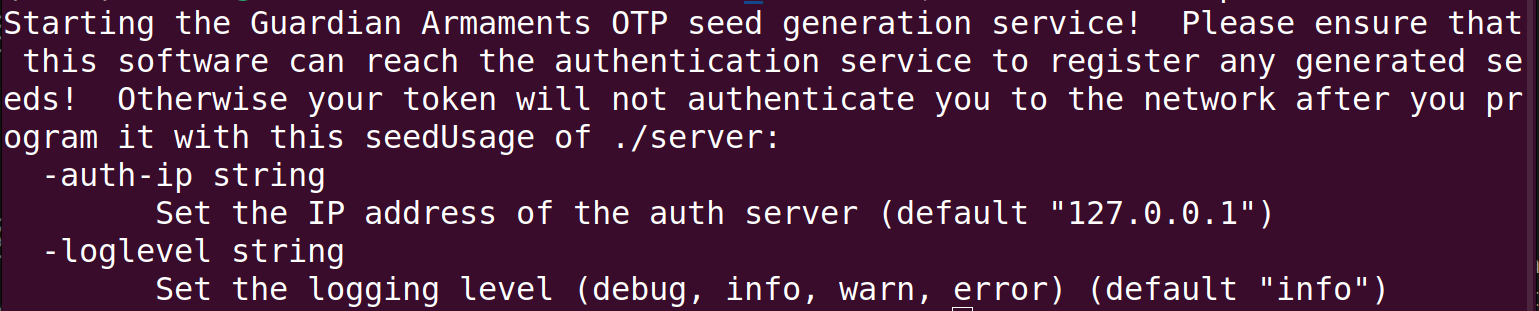
Opening the server binary in IDA we can confirm that it is a Golang binary. Looking through the main function we can identify the core aspects of the program:
- Argument handling: auth server ip, debug level
- Connects to auth server on IP_ARG:50052
- GRPC client Ping auth server
- Logs Connected to auth server
- If Auth conn success, registers new GRPC service called SeedgenAuthClient
- Logs Seedgen Server running on port 50051
The server seems to operate with two main functionalites
- Generate OTP seed for attacker
- Authenticate using OTP seed with GA authentication server
Extracting GRPC Protobufs
After finding out that the program communicates using gRPC I did some research on the topic and found that gRPC can use protocol buffers as both its Interface Definition Language (IDL) and as its underlying message interchange format.. In order the understand the communication between the OTP client and the OTP server and the OTP server and the auth server we need to extract the protobufs from the program to see what data they are exchanging.
Luckily there is a great tool called protodump https://github.com/arkadiyt/protodump that allows us to do just that.
go install github.com/arkadiyt/protodump/cmd/protodump@latest
./protodump -file server -output server_proto
This yields us two main .proto files
- auth.proto
- seed_generation.proto
auth.proto deals with communication with the GA authentication server and defines the following service:
service AuthService {
   rpc Authenticate (.auth_service.AuthRequest) returns (.auth_service.AuthResponse) {}
   rpc RegisterOTPSeed (.auth_service.RegisterOTPSeedRequest) returns (.auth_service.RegisterOTPSeedResponse) {}
   rpc VerifyOTP (.auth_service.VerifyOTPRequest) returns (.auth_service.VerifyOTPResponse) {}
   rpc RefreshToken (.auth_service.RefreshTokenRequest) returns (.auth_service.RefreshTokenResponse) {}
   rpc Logout (.auth_service.LogoutRequest) returns (.auth_service.LogoutResponse) {}
   rpc Ping (.auth_service.PingRequest) returns (.auth_service.PingResponse) {}
}
seed_generation.proto deals with OTP generation for the attackers and defines the following service
service SeedGenerationService {
  rpc GetSeed (.seed_generation.GetSeedRequest) returns (.seed_generation.GetSeedResponse) {}
  rpc Ping (.seed_generation.PingRequest) returns (.seed_generation.PingResponse) {}
  rpc StressTest (.seed_generation.StressTestRequest) returns (.seed_generation.StressTestResponse) {}
}
The main focus of our reversing needs to focus on the functions defined in seed_generation.proto because these are the functions handled by the server program.All functions defined in auth.proto are handled by the GA auth server, the server program simply calls those functions when trying to authenticate or perform other actions.
Seed Generation
Taking a look at the functions for the seed generation
- GetSeed(username,password)->
- Calls SeedgenAuthClient with username and password
- Ping-> not implemented
- StressTest(username,password,count)->
- Calls SeedgenAuthClient
countnumber of times with specified user and pass
- Calls SeedgenAuthClient
- SeedgenAuthClient(username, password)
- (test user) does not check with auth server, returns currentRand - takes username, splits into 4 bytes each, xor 4 bytes at a time with random value, at the end if they match secret user authenticated
-
(normal user) auth username/pass with auth server, if success, return currentRand
- Seed: 8571976444103895581, Count: 11018
To help with understanding the code and what it does I also set up a mock environment for the server to run in. There is a mock auth server that implements the auth.proto functions and there is the seed client that interacts with the server and calls the seed_generation.proto functions.
Running the server with my setup I get the following output when running the GetSeed function.
 Looking at the logs of
server there is some interesting json data outputed.
{"time":"2024-12-28T21:27:04.326753666-05:00","level":"INFO","msg":"Registered OTP seed with authentication service","username":"jasper_o","seed":6772816360909418114,"count":1}
Knowing that we need three values the ones that standout are “username”, “seed” and “count” these must be the 3 json values we need to get for this challenge !
Attack Planning
Goal: Find the values for “username”, “seed” and “count” when we authenticate as test user
Investigating how a test user is checked in the SeedgenAuthClient function we see
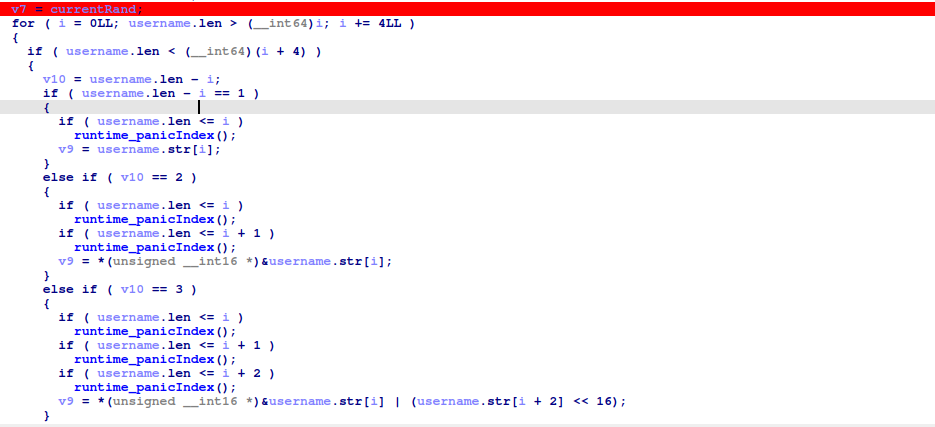
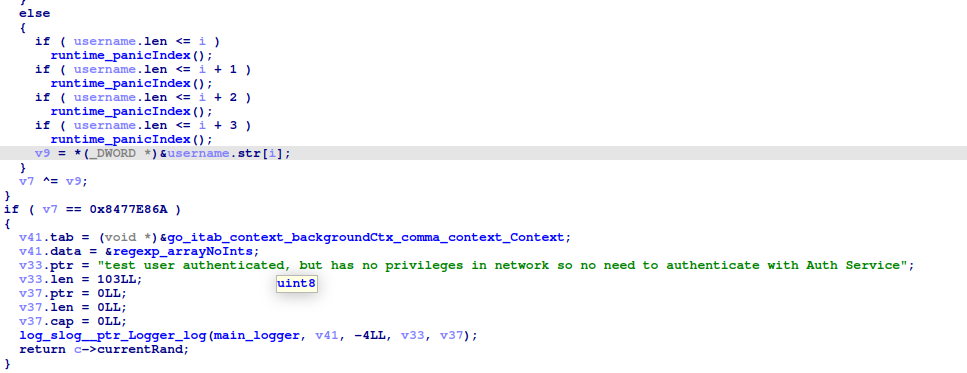
- tmp = currentRand
- It loops over the username 4 bytes at a time (Performs special cases for < 3 bytes)
- tmp = tmp XOR name_bytes
- Check if tmp == 0x8477E86A, if so we authenticate as test user !
This check has a flaw, the “random” number is not truly random, running server multiple times generates the same random numbers each time, which means that the random number generator has been seeded with a constant value !
Looking back at the program we can find that in main_NewSeedgenAuthClient
 The program sets a seed for the random function
math_rand_Seed(0x1DC9040E6A462LL);
Attack
With this knowledge we can now create a program that does the following:
- Generate random number (with seeded value)
- Check if it satisfies the test user check
- If so, output the random number and the count
- If not, increment count, move to next random number
package main

import (
	"encoding/binary"
	"fmt"
	"math/rand"
)

func Reverse(s string) string {
	runes := []rune(s)
	for i, j := 0, len(runes)-1; i < j; i, j = i+1, j-1 {
		runes[i], runes[j] = runes[j], runes[i]
	}
	return string(runes)
}

func xor4(value []byte, key []byte) []byte {
	ans := make([]byte, 4)
	for i := 0; i < 4; i++ {
		ans[i] = value[i] ^ key[i]
	}
	return ans
}

// Helper function to XOR every 4 bytes of the string with the provided key
func xorBytesWithKey(data string, key uint32) []byte {
	// Convert number to a byte slice (big-endian)
	numBytes := make([]byte, 4)
	binary.BigEndian.PutUint32(numBytes, key)
	xorResult := make([]byte, 4)
	for i := 0; i < len(data); i += 4 {

		strBytes := []byte(Reverse(data[i : i+4]))
		xorResult = xor4(strBytes, numBytes)
	}

	return xorResult
}

func main() {
	rand.Seed(0x1DC9040E6A462)

	count := 10000000000000000
	prevRand := rand.Int63()
	for i := 1; i < count; i++ {
		// Generate a random 63-bit number
		randomValue := rand.Int63()

		lower4Bytes := uint32(prevRand & 0xFFFFFFFF)

		data := "jasper_09409"
		xorResult := xorBytesWithKey(data, lower4Bytes)

		a := binary.BigEndian.Uint32(xorResult)
		if a == 0x8477E86A {
			fmt.Printf("Answer found !!\n\n")
			fmt.Printf("Count: %d\n", i)
			fmt.Printf("Seed Value: %d\n", randomValue)
			fmt.Printf("Lower 4 Bytes: 0x%X\n", lower4Bytes)
			fmt.Printf("XOR Result: 0x%X\n\n", xorResult)
			fmt.Printf("Prev seed %d, 0x%X", prevRand)
			break
		}
		prevRand = randomValue
	}
}
Ok, so we can generate numbers with our seed and check the test user, but what username do we use ? I originally was using the username from the shredded.jpg jasper_0, but when I ran the script and found a value it did not work ! After double and triple checking my script and a Get Help request, I finally found what I was missing, the rest of the username. Looking back at the first challenge we can see the full user name is jasper_09409, using this in the script gave us our flag !
{"username":"jasper_09409","seed":3755401030868833159,"count":7400755426}