Task 5 - The #153 - (Reverse Engineering, Cryptography)
Points: 450
Description:
Great job finding out what the APT did with the LLM! GA was able to check their network logs and figure out which developer copy and pasted the malicious code; that developer works on a core library used in firmware for the U.S. Joint Cyber Tactical Vehicle (JCTV)! This is worse than we thought!
You ask GA if they can share the firmware, but they must work with their legal teams to release copies of it (even to the NSA). While you wait, you look back at the data recovered from the raid. You discover an additional drive that you haven’t yet examined, so you decide to go back and look to see if you can find anything interesting on it. Sure enough, you find an encrypted file system on it, maybe it contains something that will help!
Unfortunately, you need to find a way to decrypt it. You remember that Emiko joined the Cryptanalysis Development Program (CADP) and might have some experience with this type of thing. When you reach out, he’s immediately interested! He tells you that while the cryptography is usually solid, the implementation can often have flaws. Together you start hunting for something that will give you access to the filesystem.
What is the password to decrypt the filesystem?
Downloads:
disk image of the USB drive which contains the encrypted filesystem (disk.dd.tar.gz)
Interesting files from the user's directory (files.zip)
Interesting files from the bin/ directory (bins.zip)
Prompt:
Enter the password (hope it works!)
Initial Analysis
Ok, we have given a bunch of different files and we need to find a password to decrypt the filesystem on an extra drive. Lets see what we are working with.
disk.dd
After unpacking disk.dd we can see that it is a
disk.dd: DOS/MBR boot sector, code offset 0x58+2, OEM-ID "mkfs.fat", sectors/cluster 64, reserved sectors 64, Media descriptor 0xf8, sectors/track 63, heads 255, sectors 268435440 (volumes > 32 MB), FAT (32 bit), sectors/FAT 32768, reserved 0x1, serial number 0x6d316b65, label: "USB-128 "
FAT32 disk drive with the name USB-128. Mounting the disk and taking a look at what it has,
.bindirectory with gocryptfs binary,.dataencrypted files and gocryptfs config files,lockandunlockbash scripts that encrypt and decrypt the files respectivlylock#!/bin/bash cd "$(dirname "$0")" sleep 1 sync fusermount -u ./data sleep 1unlock#!/bin/bash cd "$(dirname "$0")" sleep 1 exec ./.bin/gocryptfs "$@" -i 60s ./.data ./dataAfter researching about
gocryptfswe can see that it encrypts file contents, file names and directories in place using AES encryption (https://nuetzlich.net/gocryptfs/). We can also see that it derives the encryption keys using HKDF with the user’s password, this is what we are trying to find for this challenge. Looking intogocryptfs'threat model https://nuetzlich.net/gocryptfs/threat_model/ it seems that their were no issues with the implemention, so we must look elsewhere to find the decryption password.
bins
Unpacking bins.zip we are presented with two binaries pm and pidgin_rsa_encryption
Both files are dynamically linked and stripped, not much fun to reverse… However, looking at the strings for the applications
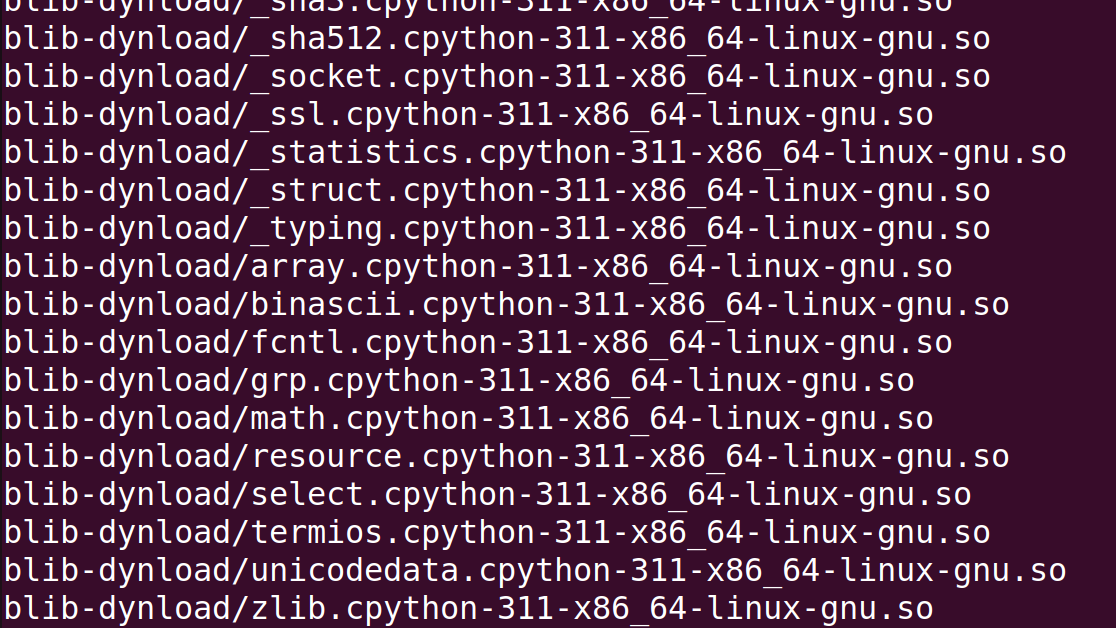 We can see that there are some references to python and cpython, which led me to believe that these are python programs that have been bundled with something like
py2exe or pyinstaller to create a binary version of the python script.
Using a tool like https://github.com/extremecoders-re/pyinstxtractor we can extract the contents of the binary. pyinstxtractor unpacks all the libraries and other files that the program need, but most importantly it extracts actual code of the program as python byte code files pm.pyc and pidgin_rsa_encryption.pyc.
Now that we have the .pyc files we can use https://pylingual.io/ to decompile the python byte code and get the source code of the two programs!
After some source code review I find the following:
- pm (password manager)
- new keystore created with
init, creates directory store encrypted passwords, name of directory is the md5 hash of masterkey - password added with
add, new password encrypted using AES-CFB, encryption key derived usingPBKDF2HMACwith constant salt and master password, iv is currenttime, iv+encrypted_password written to file - password retrieved with
read, uses master password to generate key, retrieves iv and encrypted password from file, uses AES-CFB to decrypt data
- new keystore created with
- pidgin_rsa_encryption
- Uses RSA to encrypt and decrypt IM messages
- Encrypts and decrypts messages in chunks
- Padding is deterministic because of
random.seed(a='None'), (allows for some attacks on RSA)
Files
Upon extracting files.zip find 3 directories
- .purple
- IM messages between attackers, some portions plaintext,
- passwords send through IM encrypted with
pidgin_rsa_encrypt B055MANsent the USB password usingpidgin_rsa_encrypt- AWS password sent with RSA encyption to 3 different users using
pidgin_rsa_encrypt
- .passwords
- password manager folder, created using
pm - directory name with md5 hash of master password
- List of saved passwords and each service name in plaintext
- passwords encrypted with
pm
- password manager folder, created using
- .keys
- public RSA keys for other attackers (V3RM1N, B055M4N, PL46U3)
- private RSA key for 570RM, encrypted
Proc-Type: 4,ENCRYPTED DEK-Info: AES-256-CBC,B06BB4C1901A6FAC01E078249D51F7E7 - 2048 bit keys, e=3
Attack Ideas
After looking over all the files and I started to make note of any possible issues with the attacker’s encryption methods and developed an attack plan.
Possible Vulnerabilities
pm- master password protects all
pmpasswords only uses md5 encryption - Uses
PBKDF2HMACwith static salt and master password to derive encryption key for passwords - Uses AES-CFB to encrypt passwords
- master password protects all
pidgin_rsa_encryption- Uses deterministic padding for encrypted messages
- Low e value for RSA keys, e=3
Attack
Attempt 1
My first attack attempt was to crack the md5 master password. Using the directory name as the hash bcfe19fa9cf935303d00c8ae9178e81c and hashcat I tried to find the password. This seemed too easy, I guess it was because after running all night on my laptop no passwords were found.
Attempt 2
After the first failed attempt I started looking down another path, specifically the problems with pidgin_rsa_encryption. With the two known problems, deterministic padding and low e value I started researching RSA attacks given these two constraints. After some digging I found https://github.com/ashutosh1206/Crypton/tree/master/RSA-encryption/Attack-Hastad-Broadcast, this attack seemed promising. Since 570RM sent the AWS password to 3 different people this fulfills the requirement k >= e (where k is number of recipients) for Hastad’s broadcast attack !
Modifying the PoC of the attack script I created hastad_attack.py which successfully gets us the AWS password !
Cleartext : b"\x02U\x13\xa7\xc5\x0b\r)\xa62_\xbf\x05\x93jq\xfbO~\xe9\xdf\xb5\xf9L\xfe\xa1/\xc3\x1f\x8b\xfd*gQ\xdd\xe5\t\xdd\x06\xa6\x1e\xd3\x98\xc1K\x98\\_\nb\x87\xdfa\xd4\xcb\x187x\xbb\xc0\x8d\xbfm\r)\x81>\xc8\x814\x989p\x8d\xb3\\\x01{\xfa0\x9e\nDU\xd7\x89\x9c\xac\xcd\x99O\nH:U\xa3k\x8a\xaa\xee\xf33/\x00Hey! I needed to update the AWS password since it expired. The new password is z0P<X]w?rS`'M@c<}:. Please add it to your password managers. Thanks!"
We have the AWS password. Now what? We need the password to USB-128…
Now we can take advantage of the implementation issues with pm.
Since pm uses AES-CFB we can recover the first block of the keystream because we know what the plaintext for the AWS password.
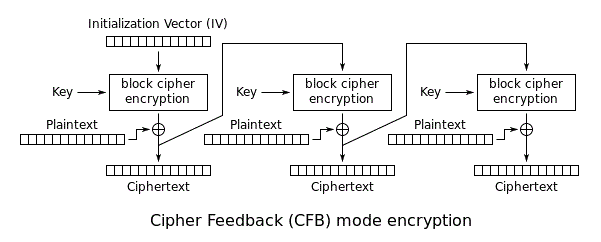
In the diagram we can see that AES-CFB just uses XOR with the keystream and the plaintext to get our encrypted output. If we reverse this so, aws_password XOR aws_password_enc = keystream. Now, why is the keystream important here? Due to a couple of other issues with pm implementation the keystream is the same for AWS and USB-128. We can leverage the keystream to get the 1st block of plaintext for USB-128 by doing keystream XOR usb-128_enc = usb-128_password !
Why does this work ? The keystream is comprised of the AES key and the IV. pm uses the master password and a static salt when deriving the AES key. Since the salt and master password are the same for the AWS and USB-128 password the same key is generated each time. The IV is just the timestamp of when a password is added with pm, since these passwords were added at the same time by 570RM they have the same IV.
After getting the first keystream block with
"z0P<X]w?rS‘M@c<}:” XOR 7030414ed7d2e57fd52cea1063f1e31c4c1a = 47697412116f3c694013335b19183b7b
And getting the first block of USB-128 plaintext with
47697412116f3c694013335b19183b7b XOR 3759355cc6bdd916953fd94b7ae9d867d4f5 = =Y$.I2KV2@S|TXXG`
However, this is not everything we need, we only were able to recover the 1st block of plaintext (16 bytes). To recover the rest of the password I had to use a python script brute_force.py to guess all passwords from the set defined in pm against gocryptfs and the encrypted files. After a bit of time we finally got the full password.
=Y$.I2KV2@S|TXXGZ-
Using it we decrypt the files and get our flag !
This was my favorite challenge out of codebreaker this year, I had a lot of fun with this one.