Task 6 - It’s always DNS - (Reverse Engineering, Cryptography, Vulnerability Research, Exploitation)
Points: 1000
Description:
The recovered data indicates the APT is using a DNS server as a part of their operation. The triage team easily got the server running but it seems to reply to every request with errors.
You decide to review past SIGINT reporting on the APT. Why might the APT be targeting the Guardian Armaments JCTV firmware developers? Reporting suggests the APT has a history of procuring information including the location and movement of military personnel.
Just then, your boss forwards you the latest status update from Barry at GA. They found code modifications which suggest additional DNS packets are being sent via the satellite modem. Those packets probably have location data encoded in them and would be sent to the APT.
This has serious implications for national security! GA is already working on a patch for the firmware, but the infected version has been deployed for months on many vehicles.
The Director of the NSA (DIRNSA) will have to brief the President on an issue this important. DIRNSA will want options for how we can mitigate the damage.
If you can figure out how the DNS server really works maybe we will have a chance of disrupting the operation.
Find an example of a domain name (ie. foo.example.com.) that the DNS server will handle and respond with NOERROR and at least 1 answer.
Prompt:
Enter a domain name which results in a NOERROR response. It should end with a '.' (period)
Initial Analysis
Using the password from last task to unlock the encrypted files on disk.dd we are presented with 3 different files.
- Corefile
- coredns
- microservice
Given that the challenge description mentions reversing the DNS server, I mainly focused on the Corefile and coredns to solve the challenge.
coredns & Corefile
Looking at the files it seemed like Corefile was a configuration file for the coredns program. Just giving the Corefile a quick look it seemed like the DNS server was configured for:
- listen on port 1053
- only allow A record queries
- filter out any queries that do not match expr type() == 'A' && name() matches '^x[^.]{62}\\.x[^.]{62}\\.x[^.]{62}\\.net-5ghgmrf2\\.example\\.com\\.$'
- enabled errors, logging, caching and frontend plugins
After doing a little research about coredns I found that it was an open source DNS server written in golang. Reading through their documentation I found that it had support for plugins, both default and community built, some of which were enabled in the Corefile.
Reversing coredns
Given that coredns was such a large application I did not want to blindly start reversing it in IDA, so I first tried to narrow my search. Given that coredns supported plugins, I figured that the attackers must have created their own plugin that allowed them to exfil data using DNS. I took the list of default plugins and compared it with the ones enabled in Corefile the only one that was not a default plugin was frontend. Searching online for the frontend plugin for coredns did not result in anything, this had to be what the attackers have added.
Opening the coredns in IDA and looking for functions that had frontend in the name.
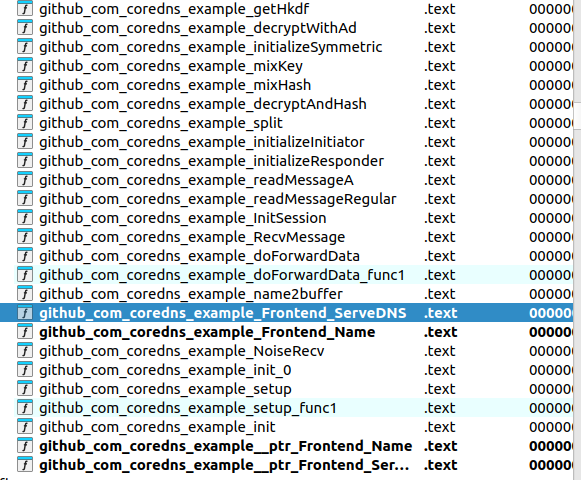 We can see some interesting functions that deal with reading messages and encryption, this confirmed my suspicions that this was the code created by the attackers.
The first thing I though of was running the code and querying a domain that would pass the filters set in Corefile
Running the server and passing in a domain name that matches the regex we get some weird output logs.
xAAAAAAAAAAAAAAAAAAAAAAAAAAAAAAAAAAAAAAAAAAAAAAAAAAAAAAAAAAAAAA\.xBBBBBBBBBBBBBBBBBBBBBBBBBBBBBBBBBBBBBBBBBBBBBBBBBBBBBBBBBBBBBB\.xCCCCCCCCCCCCCCCCCCCCCCCCCCCCCCCCCCCCCCCCCCCCCCCCCCCCCCCCCCCCCC\.net-5ghgmrf2\.example\.com\.
[ERROR] plugin/frontend: error decoding input:
Ok, this is a start…
Looking further at the function __golang github_com_coredns_example_Frontend_ServeDNS

We can see some references to debug messages, but not seeing them in the output of the program. Looking at the coredns docs I found that we can enable debug output by adding debug to enable the plugin in the Corefile. Doing that we gain some additional output.
[DEBUG] plugin/frontend: bad name: illegal base32 data at input byte 184
Nice, looking through the flow of the ServeDNS function I found that it calls github_com_coredns_example_name2buffer. This function takes in our query and :
- Splits on ‘.’
- Combines each section of the query together so,
xAAAAAAAAAAAAAAAAAAAAAAAAAAAAAAAAAAAAAAAAAAAAAAAAAAAAAAAAAAAAAA\.xBBBBBBBBBBBBBBBBBBBBBBBBBBBBBBBBBBBBBBBBBBBBBBBBBBBBBBBBBBBBBB\.xCCCCCCCCCCCCCCCCCCCCCCCCCCCCCCCCCCCCCCCCCCCCCCCCCCCCCCCCCCCCCC\.net-5ghgmrf2\.example\.com\.
becomes
AAAAAAAAAAAAAAAAAAAAAAAAAAAAAAAAAAAAAAAAAAAAAAAAAAAAAAAAAAAAAABBBBBBBBBBBBBBBBBBBBBBBBBBBBBBBBBBBBBBBBBBBBBBBBBBBBBBBBBBBBBBCCCCCCCCCCCCCCCCCCCCCCCCCCCCCCCCCCCCCCCCCCCCCCCCCCCCCCCCCCCCCC
- Removes x,y
- Replaces z with =
- base32hex decode
With a valid base32hex input passed we now get
x85146GA28D0K4GQ1891K2GI385146GA28D0K4GQ1891K2GI385146GA28D0K4G.xQ1891K2GI385146GA28D0K4GQ1891K2GI385146GA28D0K4GQ1891K2GI38514.x6GA28D0K4GQ1891K2GI385146GA28D0K4GQ1891K2GI385146GA28D0K4GOzyy.net-5ghgmrf2.example.com.
[DEBUG] plugin/frontend: got data: AAAAAAAAAAAAAAAAAAAAAAAAAAAAAAAAAAAAAAAAAAAAAAAAAAAAAAAAAAAAAABBBBBBBBBBBBBBBBBBBBBBBBBBBBBBBBBBBBBBBBBBBBBBBBBBBBBBBBBBBBBBCCCCCCCCCCCCCCCCCCCCCCCCCCCCCCCCCCCCCCCCCCCCCCCCCCCCCCCCCCCCCC
[DEBUG] plugin/frontend: bad decrypt: bad handshake
Cool, so now we can pass our arbitrary data to the frontend plugin. Now it looks like our data is being used in some sort of encryption handshake, time to get our hands dirty.
After printing out the got data message the program calls the function github_com_coredns_example_NoiseRecv. Looking at this function it creates a new Noise session object and calls github_com_coredns_example_InitSession. Looking at the init session function it either starts as a responder or initiator, based on our intel that the server only receives GPS coordinates we can assume that it is the responder.
Looking at the github_com_coredns_example_initializeResponder function we can see that it uses the string Noise_K_25519_ChaChaPoly_BLAKE2s to help with initiation. Seems like the settings for our encryption protocol, but did not really make much sense to me at the time. Researching based on this string led me to the Noise Protocol Framework. Now things started to make more sense.
Reading through the spec we can start to break down what the string means.
Noise_K_25519_ChaChaPoly_BLAKE2s
- Noise: noise protocol framework
- K: K One way handshake pattern
- 25519: Diffie Hellman key exchange
- ChaChaPoly: ChaChaPoly cipher function
- BLAKE2s: hash function
K One-Way Handshake Pattern
K:
  -> s
  <- s
  ...
  -> e, es, ss
In order to create a handshake with the server we need to know what information goes into it and how it is performed. The diagram above outlines how the handshake is performed.
The 2 types of keys used in Noise protocol are static and ephemeral, static keys are supposed to denote the identity of the receiver and sender and are not changed frequently. Ephemeral keys are changes with every conversation and provide unique keys for every transaction.
- tokens:
- s: static keys
- e: ephemeral keys
- es: DH(e,s)
-
ss: DH(s,s)
- pre messages
-> sand<- sare pre messages meaning they happen before the handshake (denoted by coming before the...) So the public static keys are exchanged between the DNS server and client prior to handshake - handshake message
-> e, es, ssthe handshake is comprised of one message from client to DNS server, composed of the client_e_pub, DH(client_e_priv,server_s_public) and DH(server_s_pub,client_s_priv)
We need to find the keys that the server uses. In the initializeResponder we can see where the program calls MixHash() as specified in the spec, but the key values are passed in as arguments. Backtracking up the call stack we can see that some values are being passed into github_com_coredns_example_NoiseRecv (note the names of the keys were added by me when reversing)
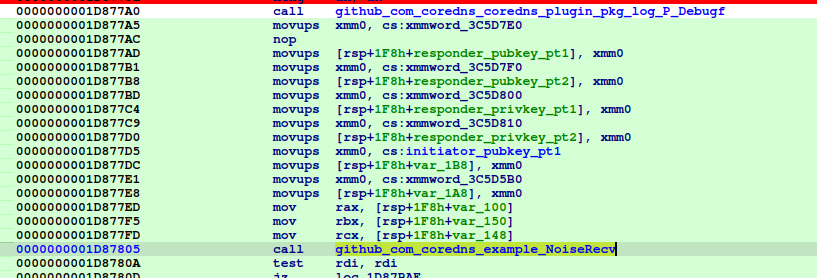 These data locations are only referenced here and in
github_com_coredns_example_init
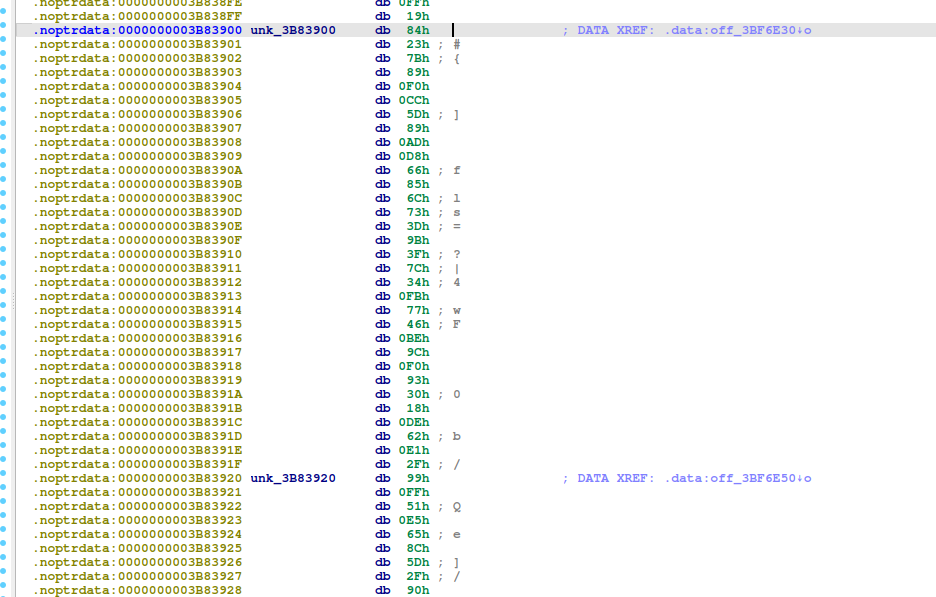
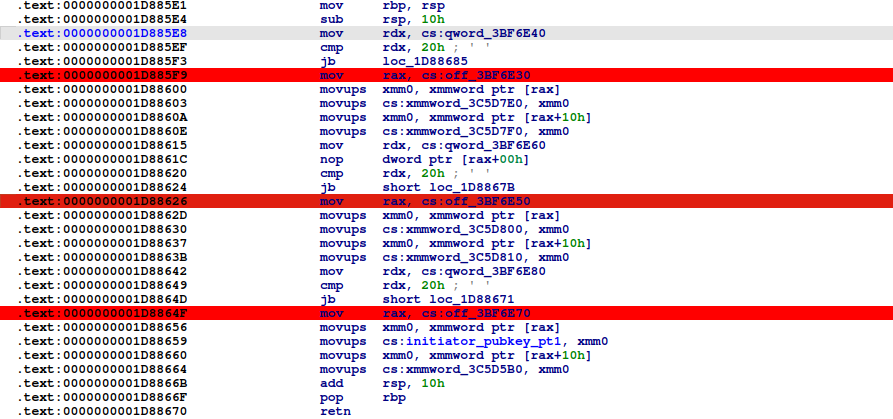 Checking out this function we can see that 3 locations are referenced and 32 bytes from each are loaded into our key values !
Looking at those locations we find our keys !
Attack
So, what info do we currently have:
- responder (dns server)
- server_s_pub
- server_s_priv
- initiator (dns client)
- client_s_pub
- we generate
- client_e_pub
- client_e_priv
Ok, but to perform the handshake we need the client’s private key… This is where KCI comes into the picture.
Reading about Payload Security Properties for pattern K in the specs we can see that it is vulnerable to
Sender authentication vulnerable to key-compromise impersonation (KCI). The sender authentication is based on a static-static DH ("ss") involving both parties' static key pairs. If the recipient's long-term private key has been compromised, this authentication can be forged. Note that a future version of Noise might include signatures, which could improve this security property, but brings other trade-offs.
This basically means that since we know the recipient’s (dns server) private static key we can impersonate anyone to the recipient, so we can impersonate being the dns client to the dns server without ever knowing the client’s key !
This is a break down of what computations we need to perform to impersonate a handshake from client to dns server.
Write Message
Here are the main things we need to change when generating our handshake message.
e, generate a new ephemeral key- append
e.pubto handshake - MixHash(e.pub_key)
- append
es,MixKey(DH(client_e_priv, server_s_pub))ss,MixKey(DH(server_s_priv, client_s_pub))
I implemented these changes by modifying dissononce an open-source python noise project. This will give us our handshake message that we need to pass to the server in the encoded format.
xAS0MO0CJVDN9RO640TNMOJ7VV31GUME9SN5UA6AJANSJDUG2F5BM9QMU95DKJQ\.xLP7CN2S0U2BBC6SM6GA3VHRNO5OT607TRTR9Q4CO5JGQSSMzzzyyyyyyyyyyyy\.xyyyyyyyyyyyyyyyyyyyyyyyyyyyyyyyyyyyyyyyyyyyyyyyyyyyyyyyyyyyyyy\.net-5ghgmrf2\.example\.com\.
And we get a response back !

And we can see our decoded data displayed in the logs too !

Now we can submit our flag !
xAS0MO0CJVDN9RO640TNMOJ7VV31GUME9SN5UA6AJANSJDUG2F5BM9QMU95DKJQ\.xLP7CN2S0U2BBC6SM6GA3VHRNO5OT607TRTR9Q4CO5JGQSSMzzzyyyyyyyyyyyy\.xyyyyyyyyyyyyyyyyyyyyyyyyyyyyyyyyyyyyyyyyyyyyyyyyyyyyyyyyyyyyyy\.net-5ghgmrf2\.example\.com\.